
Vivo phones are popular for their cameras and slim designs, and many of them support fast charging. When a Vivo stops charging reliably, owners often suspect the battery first, but the charging port is a very common culprit, especially on phones that are a couple of years old. A port that wobbles, a cable that only works at one angle or a phone that charges to eighty percent and then stalls can all point to the port. This guide explains the signs, how to check before you pay for a repair and what the replacement involves.
Start with the cable and the adapter
Charging cables wear out faster than the port they plug into. Before anything else, try a different cable and adapter, ideally the ones that came with the phone. If another set charges normally, the old cable or adapter was the problem. Vivo phones with fast charging also need a compatible adapter for the higher speed, so a slow charge with a generic adapter may simply mean the phone is charging at the basic rate. Our guides on fast charging not working and choosing a good charger explain the details.
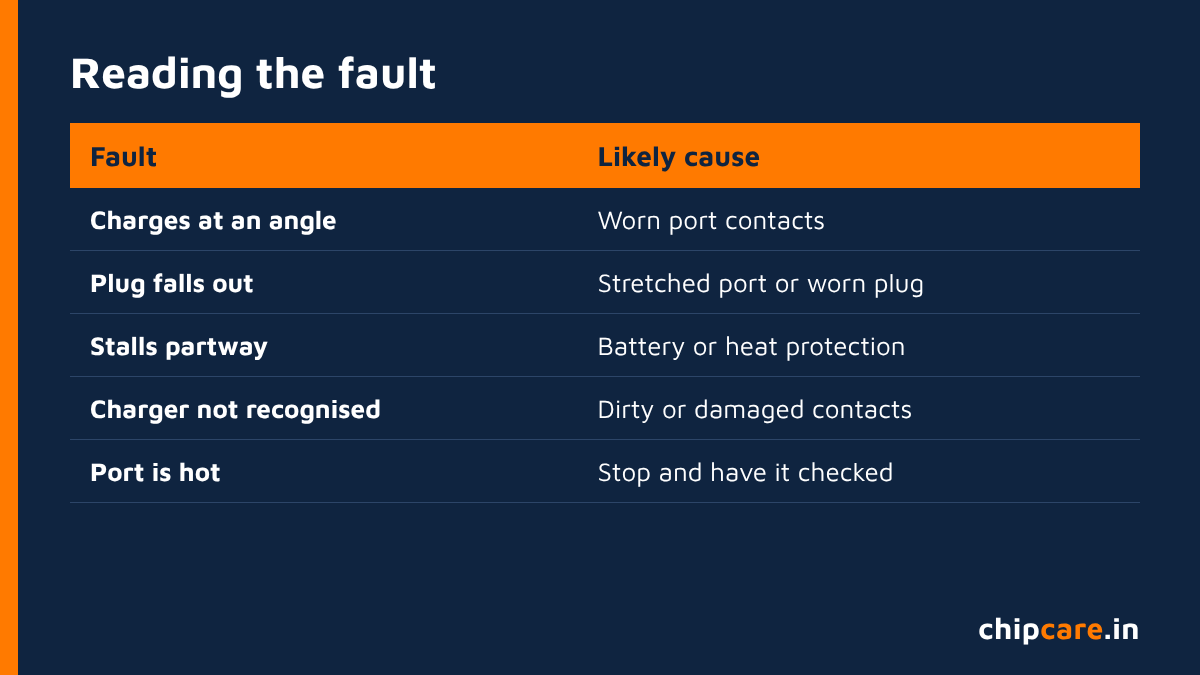
Reading the fault
| Fault | Likely cause | First action |
|---|---|---|
| Charges only if the cable is held at an angle | Worn port contacts | Try another cable, then check the port |
| Plug falls out easily | Stretched port or worn cable plug | Compare with another cable |
| Charging stalls partway | Battery or temperature protection | Check battery health and heat |
| Phone not recognising the charger | Dirty port or damaged contacts | Clean gently and retest |
| Port is warm or hot | High resistance in the contacts | Stop and have it checked |
The cable is cheap to replace and the port is not, so always rule out the cable first.
Cleaning the port
Lint is the number one cause of loose-feeling charging. Switch the phone off and look into the port with a torch. Use a wooden toothpick or a plastic pick to lift the debris gently, running the tip along the walls and avoiding the centre tongue, which holds the contacts. Do not use a metal pin or a needle. A small, soft brush can help. After cleaning, plug a cable in and check that it clicks in firmly. Many "dead ports" are brought back by this step alone. Our guide on how to clean a phone charging port shows the method in detail.
What the replacement involves
- Diagnose first.
The technician tests with a known-good cable and checks the port with a light and a meter. - Open the phone.
Vivo phones are sealed. The back glass or the screen is lifted with heat and plastic tools. - Disconnect the battery.
This is always the first step inside the phone. - Remove the sub-board or port.
On many models the port is on a small board with a flex cable. On others it is soldered to the main board. - Fit the new part.
The new sub-board is screwed down and connected. A soldered port is desoldered and replaced with hot-air equipment. - Test.
Charging speed, stability, data connection and the microphone on the sub-board are all checked before the phone is sealed.
You can browse mobile phone charging ports by model, and see our guide to fixing a phone charging port problem for more troubleshooting.
Check the battery at the same time
A phone that stops charging at a certain level, or that shuts down quickly, may have a worn battery. If the phone is a couple of years old, ask the technician to test it. If it is weak, replace it at the same time, as the labour overlaps. See Vivo battery replacement cost and why a phone charges slowly.
Watch for heat and smell. If the port, the plug or the charger gets very hot or smells burnt, unplug at once. Do not keep charging a phone that overheats. See phone heating while charging.
Common mistakes
- Replacing the port when the cable was the problem.
- Cleaning with metal tools, which damage contacts.
- Choosing a sub-board of poor quality that fails within weeks.
- Ignoring a worn battery that causes the same symptoms.
- Using a cheap, unbranded charger that wears the port and battery.
Keeping the new port healthy
A repaired port lasts longer with good habits. Pull the plug by its body and not by the cable. Do not use the phone while the cable is stretched or bent at a sharp angle. Use a quality cable and replace it when the plug gets loose. Keep the port free of lint by cleaning it gently every few months. If you repair phones for customers, test with the original charger and record the result. Our guide on how to test phone parts before installing shows the routine. Tools are in mobile repairing tools.
For background on the connector, see the page on USB-C.
Questions to ask before the repair
- Is the port on a sub-board that can be swapped, or soldered to the main board?
- Which grade of part will you fit, and can I see it?
- Will you test charging speed and the microphone on the sub-board?
- Do you reseal the phone with fresh adhesive?
- What warranty comes with the part and the labour?
A good shop answers these without hesitation. Because Vivo phones are sealed, the opening and resealing are a big part of the job, and the shop's skill shows here as much as in the port itself. Check that the back glass sits flush afterwards and that there is no gap along the edge. If the phone was water resistant before, ask what has changed, because resealing may not restore the original rating, and you should avoid exposing it to water as before.
It also helps to know that a replacement port does not fix a bad cable, so keep a known-good cable at home for comparison. If the new port works with that cable and fails with another, you have found your old problem. Take a moment to test every cable you own and retire any that fail, so that they do not wear out the new port.
Frequently asked questions
Why does my Vivo charge only at one angle?
The port contacts are probably worn or the cable plug is. Try another cable, then check the port for lint and wear.
Can I fix a loose Vivo charging port myself?
You can clean it safely. A replacement is a delicate job on sealed phones, and a professional is safer.
Why does my phone stop charging at a certain percentage?
It can be battery protection, heat or a worn battery. Check temperature and battery health before you blame the port.
How much does a Vivo charging port repair cost?
It depends on whether the port is on a sub-board or soldered, and on the part grade. Ask for a quote that names the part.
Will fast charging work after the repair?
It should if the part is good and matches your model. Test with the original adapter and cable.
Is a hot charging port dangerous?
It can be. Stop charging and have the port and charger checked.