A phone that dies at 30 percent, gets warm for no reason, or needs a charger every few hours is telling you something about its battery. The good news is that you can check battery health on both iPhone and Android in a couple of minutes, and the result tells you whether you need a new battery or just a different habit. This guide covers how to check, how to read the numbers, and when replacement is the right call.
Why phone batteries wear out
Phones use lithium-ion batteries, and every one of them ages. Each charge cycle, high temperature and long periods at 100 percent all take a small amount of capacity away. The result is shorter runtime and, over time, a battery that cannot deliver peak power when the phone needs it. Apple describes this in its page on iPhone battery and performance, and the same ideas apply to any modern phone.
How to check battery health on an iPhone
- Open Settings and tap Battery.
Then tap Battery Health & Charging, or Battery Health on some versions. - Read Maximum Capacity.
This percentage compares the battery's current capacity with when it was new. Newer iPhones also show cycle count and whether a replacement is recommended. - Check Peak Performance Capability.
A message here tells you if the phone has applied performance management after an unexpected shutdown.
Apple states that batteries on iPhone 14 models and earlier are designed to retain 80 percent of original capacity at 500 complete charge cycles, and newer models at 1,000 cycles, under ideal conditions. Below roughly 80 percent, you will typically notice the change.
How to check battery health on Android
Android is less uniform. Some phones now show battery health directly in Settings, and some makers add it to their own diagnostics app, for example Samsung Members on Samsung phones. Where the phone does not show it, dialer codes and apps exist, but their accuracy varies and some read estimates only. If your phone offers an official battery or diagnostics screen, use that first.
When there is no direct reading, use these signs instead:
- The phone loses more than about 20 percent in an hour of light use.
- It shuts down at 20 to 30 percent, especially in the cold.
- The percentage jumps, for example from 40 to 15 percent in seconds.
- It needs charging twice in a working day when it used to last one.
- The phone is hot while idle.
What the numbers mean and what to do
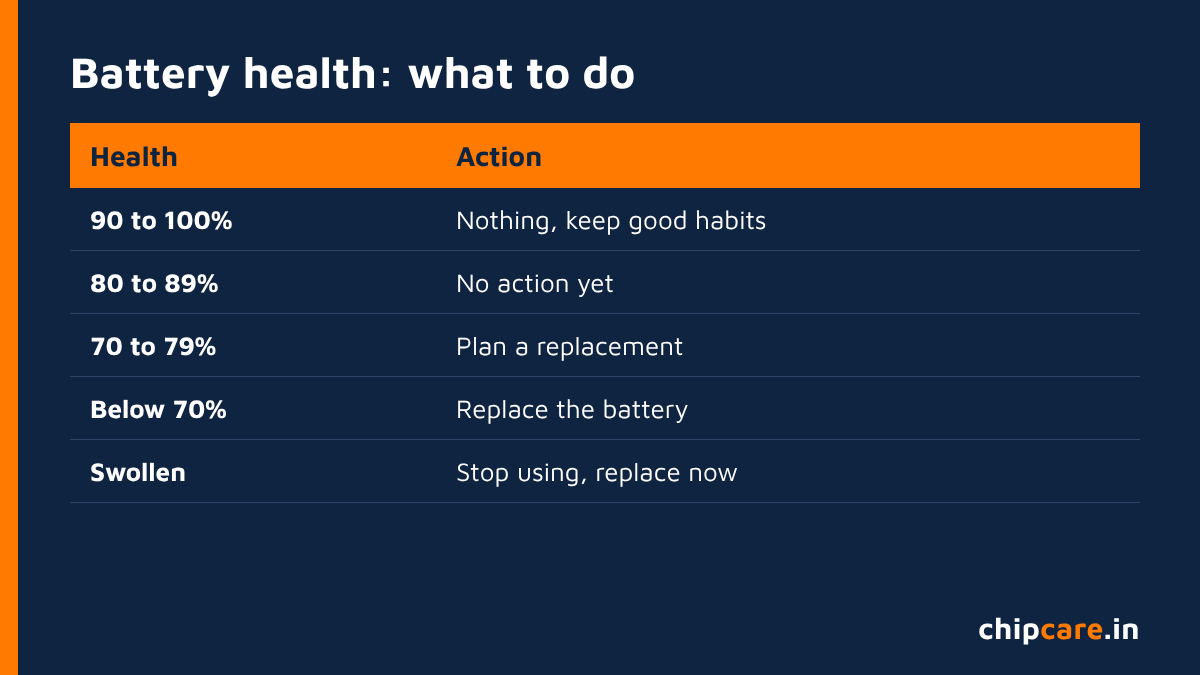
| Battery health | What you will notice | What to do |
|---|---|---|
| 90 to 100 percent | Normal runtime | Nothing; keep good charging habits |
| 80 to 89 percent | Slightly shorter runtime | No action needed yet |
| 70 to 79 percent | Clear drop in daily runtime, occasional slowdowns | Plan a replacement, especially if you rely on the phone all day |
| Below 70 percent | Short runtime, shutdowns, heat | Replace the battery |
| Swollen or bulging | Back cover lifting, screen pushing up | Stop using and replace at once |
Safety: A swollen battery is a hazard. Do not press it, charge it, or puncture it. Power the phone off and get the battery replaced as soon as you can.
Replace the battery or buy a new phone?
If the rest of the phone works well, a battery replacement is by far the cheaper way to get another year or two out of it. It costs a fraction of a new handset and keeps your setup as it is. Replace the phone instead if it no longer gets software updates you need, if the screen or board is also failing, or if it cannot run the apps you rely on. If the screen is cracked too, doing both jobs together saves a second teardown, and our guide to mobile screen replacement cost helps you budget.
A new battery in a phone you already like usually beats a new phone you have to set up from scratch.
Choosing the right replacement battery
Batteries are model-specific, so match your exact phone model number, not just the brand. Browse our mobile batteries or go straight to your brand: iPhone, Samsung, Vivo, Oppo, Realme, Xiaomi or OnePlus. Compare the part type and warranty on each listing. A low-quality cell with an inflated mAh number is a common trap; a battery cannot hold more than its cells allow, so an unusually high figure at a low price deserves suspicion.
Is it the battery, or the charging port?
Slow or intermittent charging is not always the battery. Lint in the port, a worn cable or a loose connector can mimic a dying cell. Try a different cable and charger first, and clean the port gently with a wooden toothpick. If the cable still wobbles or only charges at an angle, look at a replacement from our charging ports and cables range. If a laptop is the problem instead, our guide on laptops that will not charge covers it.
How to slow battery wear
- Avoid leaving the phone in a hot car or under a pillow while charging.
- Do not chase 0 to 100 every time. Battery University notes that partial discharges are gentler on lithium-ion cells.
- Use the optimised or adaptive charging feature if your phone has one.
- Use a good-quality charger and cable that match your phone's rating.
- Remove thick cases while fast charging if the phone gets hot.
Be careful with DIY if you decide to replace the battery yourself. You need proper pry tools, a way to soften adhesive, and care not to bend the cell. A basic kit from our mobile repairing tools collection helps, and if you are not confident, a technician can do it quickly.
Get the right battery for your phone
Search by brand and model. Every battery lists the part type and warranty.
Common battery myths, sorted
- "Close all apps to save battery." Reopening apps from scratch often uses more power than leaving them suspended. Restart a misbehaving app, not everything.
- "Overnight charging ruins a battery." Modern phones stop charging at full and many have optimised charging. Heat is a bigger problem than the plug.
- "You must fully drain the battery first." That advice belonged to older nickel batteries. Lithium-ion cells have no memory effect and prefer partial charges.
- "A bigger mAh number always means better." The number only helps if the cell is genuine and well made. A cheap pack that claims more than the original is usually not telling the truth.
It also helps to understand what a battery health figure is not. It is an estimate of capacity, not a guarantee of how the phone will behave tomorrow, and different phone makers calculate it differently. Two phones at 85 percent may feel different in daily use because of screen size, software and how many apps run in the background. Treat the number as one clue, and trust your own day-to-day experience alongside it.
Frequently asked questions
How do I check my phone's battery health?
On an iPhone, open Settings, then Battery, then Battery Health. On Android, check Settings or the maker's diagnostics app, since availability varies by brand and model. Without a direct reading, judge by runtime, shutdowns and heat.
What battery health percentage means I should replace it?
Many people replace around 80 percent if they notice shorter runtime, and most should replace below roughly 70 percent. A swollen battery needs replacing immediately, whatever the figure.
How long does a phone battery last?
It depends on use and temperature, but many phone batteries show clear wear after two to three years of daily charging.
Is it worth replacing the battery on an old phone?
Usually yes, if the phone still gets the updates you need and the screen and board are fine. It costs much less than a new handset.
Is a swollen phone battery dangerous?
Yes. It can leak or overheat. Stop using and charging the phone and replace the battery as soon as possible.
Does fast charging damage the battery?
Fast charging creates more heat, which ages a battery faster over time, but modern phones manage this well. Keep the phone cool and use a charger suited to it.