


Your phone used to charge from nearly empty to full in under an hour, and now it takes twice as long, or the "fast charging" message never appears. Fast charging problems are common, and they have a long list of possible causes: the cable, the adapter, the port, the battery, the temperature and even the software. This guide works through them in a sensible order, so that you can fix the cheap problems first and avoid replacing parts that were never at fault. It applies to most Android phones with fast charging, whatever the brand.
Understand what fast charging needs
Fast charging is a chain of parts that must all agree. The adapter must be able to supply the higher power, the cable must be rated to carry it and the phone's charging circuit must accept it. Different brands use different protocols, and a charger that supports one may only deliver a slower speed to another. If any link is weak, the phone drops to a slower rate. The phone also limits charging when it is hot, when the battery is nearly full or when the battery is worn. So a slow charge is a symptom with many possible causes, and the answer is to test each link. Our guide to fast charging vs normal charging explains how the system works, and how to choose the best charger helps you buy the right adapter.
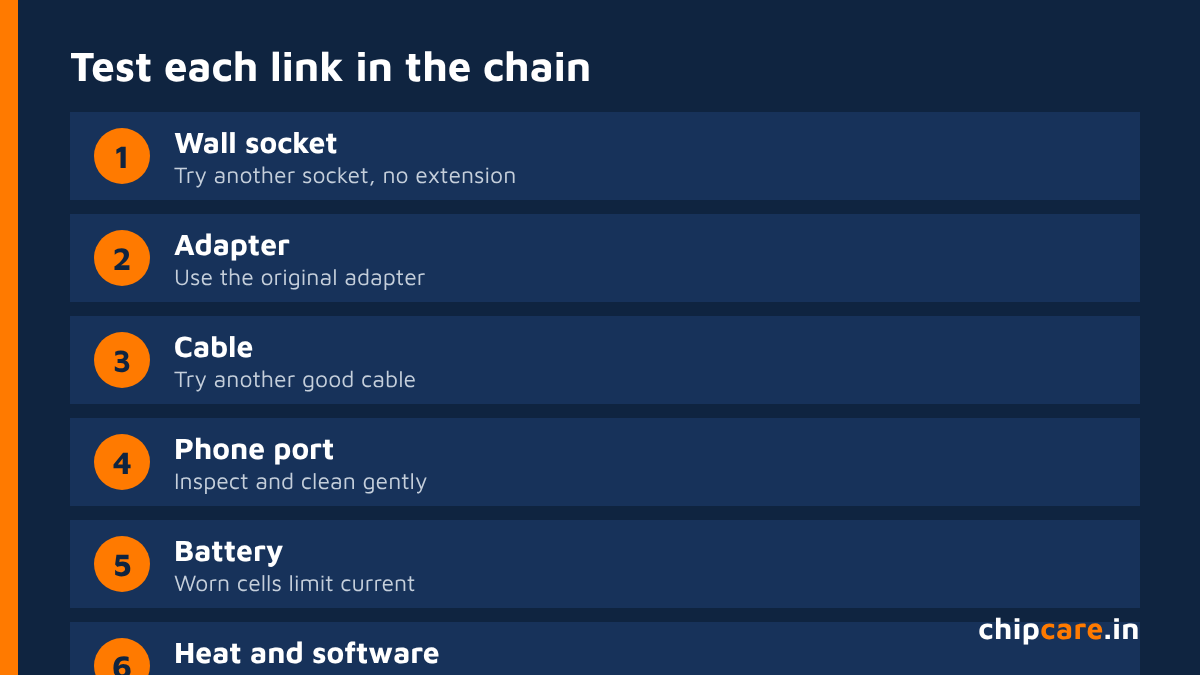
Where faults occur
| Link | Typical fault | Test |
|---|---|---|
| Wall socket and extension | Loose or weak supply | Try another socket |
| Adapter | Lower power or wrong protocol | Use the original adapter |
| Cable | Wear, thin wires, no fast-charge support | Try another good cable |
| Phone port | Lint, bent contacts, wear | Inspect and clean |
| Battery | Worn cell cannot take high current | Check battery health |
| Software and heat | Throttling, bug | Cool, update, restart |
Never judge fast charging by the message on the screen alone. Measure how quickly the percentage rises.
Step by step: how to test
- Use the original adapter and cable.
Plug them into a wall socket, not into an extension board or a laptop. - Time a ten-minute charge.
Note the percentage, charge for ten minutes with the screen off and note it again. Compare with what you remember or what the maker claims. - Swap the cable.
Try another cable known to support fast charging. If the speed improves, replace the cable. - Swap the adapter.
Try another adapter made for your phone. - Check the temperature.
If the phone is hot, let it cool, and remove the case. - Clean the port.
With the phone off, lift lint with a wooden toothpick. See how to clean a phone charging port. - Update and restart.
Install the latest system update. - Use a USB meter if you have one.
It shows the voltage and current, so you can see exactly where the speed is limited.
When the port or battery is at fault
If a good cable and adapter still give a slow charge, the port or the battery is likely to blame. A loose plug or a connection that works only at one angle points to the port. See phone charges only when the cable is wiggled. A battery that drains fast, shuts down early or jumps in percentage points to wear. See when to replace a phone battery. You can browse mobile phone charging ports and mobile phone batteries by model.
Beware of cheap fast chargers. Unbranded chargers may claim high power but lack proper protection, which can damage the phone or become a fire risk. Use the original or a reputable brand.
Common mistakes
- Using a power bank or a laptop port and expecting fast charging.
- Using a cable that supports data and slow charging only.
- Charging with a thick case in a hot room.
- Replacing the battery when the cable was the problem.
- Ignoring a loose port until it fails completely.
Charging habits that last
Fast charging is convenient, but heat is the main enemy of a battery. Use fast charging when you need a quick top-up, and a slower charger overnight if your phone allows it. Avoid charging in direct sun or under a pillow. Do not let the battery sit at zero for long periods. Keep an eye on how long a full charge takes, because a gradual increase is an early sign of wear. If the phone gets hot while charging, see phone heating while charging. For slow charging that is not about fast-charge standards at all, see why a phone charges slowly.
Repair shops can add a charging-speed test to the end of every battery and port job. A USB meter is inexpensive and shows at once whether the repair worked. See how to test phone parts before installing.
For background on the standards, see the page on USB Power Delivery.
What a good shop will check
A repair shop with the right tools will test the charging chain in a few minutes. They plug a power meter between the adapter and the phone, watch the voltage and current and compare them with the figures expected for your model. They test the cable on its own, then the port with a known-good cable, then the battery under load. If the current falls when the phone gets warm, they look at heat and software. If it never rises, they look at the port and the battery. The result is a specific answer rather than a guess, and it tells you exactly which part to replace. Ask the shop to show you the readings, and ask for a written note of the cause. It is a small request that tells you a lot about how careful the shop is.
If you are testing at home, keep notes. Record the starting percentage, the time and the ending percentage for each combination of adapter and cable. A simple table shows quickly which pair charges fastest, and it gives you evidence if you need to return a poor cable or adapter. Use the same conditions each time: screen off, same room, same starting level, so that the comparison is fair.
Frequently asked questions
Why is fast charging not working on my phone?
The usual causes are a non-compatible adapter or cable, a dirty or worn port, heat or a worn battery. Test each in turn.
Can any cable do fast charging?
No. The cable must be rated for the current and support the protocol. Cheap cables often do not.
Does heat slow fast charging?
Yes. Phones reduce the speed when they get hot, to protect the battery.
How can I measure the charging speed?
Time a ten-minute charge, or use a USB power meter that shows voltage and current.
Will a new battery restore fast charging?
If the old battery was worn and was limiting the current, yes. Check the cable and port first.
Is fast charging bad for the battery?
It produces more heat, which can speed up ageing a little. Use it when needed and use slower charging overnight if you can.


