

The charging port is the part of a Redmi phone that gets the most abuse. It is plugged and unplugged several times a day, it collects pocket lint and it takes the strain every time someone tugs on a cable. When it wears out, the symptoms are irritating: the phone charges only at one angle, the cable falls out, charging is slow or the phone says "charging" and the percentage never moves. This guide explains how to tell a port fault from a cable or charger fault, what the repair involves and what affects the cost.
Rule out the easy causes first
Before you pay for a port repair, check three simple things. Try another cable and adapter, because worn cables are the most common cause of intermittent charging. Look into the port with a torch for lint, which packs down over months and stops the plug from seating. Restart the phone, as software hiccups can also stop charging. If a different cable and adapter fix the problem, the port is fine. Our guides on phone not charging fixes and how to clean a phone charging port take you through the steps safely.
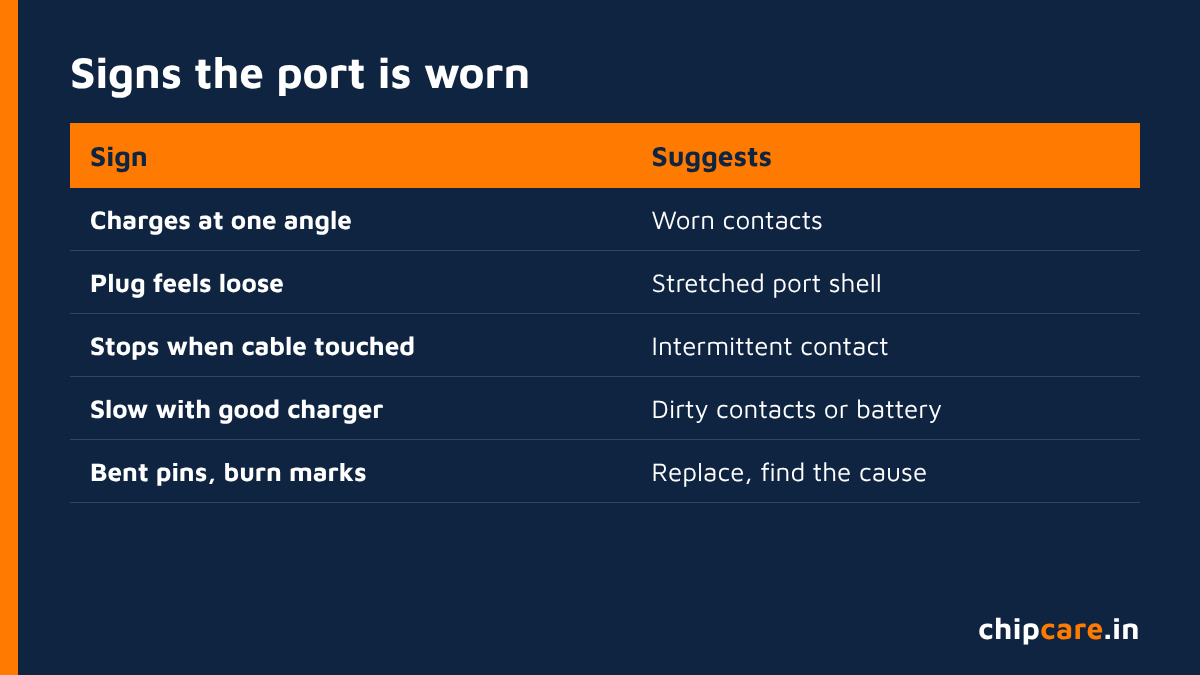
Signs the port is worn
| Sign | What it suggests |
|---|---|
| Charges only at one angle | Worn contacts or loose port |
| Plug feels loose or falls out | Stretched port or bent shell |
| Charging stops when you touch the cable | Intermittent contact |
| Slow charging with a good charger | Dirty or damaged contacts, or battery issue |
| Phone not detecting the cable | Port fault or moisture warning |
| Visible bent pins or burn marks | Replace the port, and find out why it burned |
If a different cable and adapter do not help, and the port looks clean, the port itself is the likely culprit.
What the repair involves
On many Redmi phones, the charging port is mounted on a small sub-board that is connected to the main board by a flex cable. Replacing the sub-board is a modular job: the technician opens the phone, disconnects the battery, unscrews the sub-board and fits a new one. On some models, the port is soldered directly to the main board, and replacing it needs soldering skills and equipment. Ask which applies to your phone before you agree on a price, because the cost and risk are very different.
The job also depends on how the phone is sealed. Many Redmi phones need the back glass lifted, and a few need the screen lifted. Each adds labour and a small risk of cracking glass. You can browse mobile phone charging ports and sub-boards by model.
What decides the cost
- Sub-board or soldered port. A modular sub-board is cheaper and lower risk than a soldered port.
- Access. Back-opening models are easier than screen-opening ones.
- Part quality. Original-grade sub-boards are better than cheap ones with poor contacts.
- Extra faults. A damaged microphone or flex cable on the same sub-board may need replacing too.
- Labour and testing. Good shops test charging speed and data transfer.
Step by step: before you go to the shop
- Try another cable and adapter.
Use ones that you know work on another phone. - Clean the port gently.
With the phone off, use a wooden toothpick to lift lint. Do not use metal. - Check for liquid.
If the phone shows a moisture warning, dry it fully and read what to do after water damage. - Note the symptoms.
Tell the technician when it fails, such as "only at an angle" or "stops when I touch it". - Ask for a quote that names the part.
Sub-board or soldered port, grade and warranty. - Test after repair.
Check charging at the speed expected, steady percentage and, if you use it, data transfer.
Check the battery too
A phone that charges slowly or not at all might have a worn battery rather than a worn port. If the battery is old, the phone may also shut down early or drain fast. A technician can check both. If the battery needs replacing, doing both repairs at the same time saves labour. See Redmi battery replacement cost, and our guide on why a phone charges slowly.
Do not keep using a burnt or hot port. A port that gets hot, smells burnt or shows scorch marks can be a fire risk. Stop using it, switch off the phone and have it checked.
Looking after the new port
- Pull the plug by its body, not by the cable.
- Use a good-quality cable and avoid very cheap ones with loose plugs.
- Do not use the phone while the cable is bent or under strain.
- Clean the port gently every few months to remove lint.
- Keep the phone away from moisture while charging.
Choosing a good charger and cable helps too. See how to choose the best charger for your Android phone. For background on the connector, see the page on USB-C. Our guide on USB-C vs Lightning port repair explains how these connectors differ in repair.
Repair shops: a quick checklist
If you fix Redmi phones for customers, test the port before you open the phone by plugging a known-good cable in at different angles and watching the charge indicator. After fitting the new part, test charging at full speed and check that the cable seats firmly. Keep a record of which sub-board fits which model. Our guide on how to test phone parts before installing offers a bench routine.
Questions to ask the technician
- Is my port on a sub-board or soldered to the main board?
- Which grade of part will you fit, and does it come with a warranty?
- Will you test charging speed and data connection after the repair?
- Is the microphone or flex cable on the same sub-board, and will it be replaced too?
- What happens if the fault returns in the first month?
Clear answers, ideally written on the job sheet, show that the shop knows what it is doing. If the answers are vague, get a second quote. A charging port repair is a routine job for a good technician, and it should be priced and warranted like one.
Frequently asked questions
How do I know if my Redmi charging port is faulty?
If a different cable and adapter do not help, the port is clean and charging is intermittent or slow, the port is likely worn.
Can I clean the charging port myself?
Yes, gently, with the phone off and a wooden toothpick. Do not use metal tools.
Is a charging port repair expensive?
It depends on whether the port is on a sub-board or soldered to the main board. A sub-board is usually cheaper and lower risk.
Can a bad port damage the battery?
Intermittent charging can stress the battery and the board, and a burnt port is a hazard. Repair it promptly.
How long does the repair take?
Many shops do it the same day if the part is in stock.
Will my data be safe?
A port repair should not touch your data, but back up first as a precaution.


