

Battery saver tips spread faster than any other kind of phone advice. Close all your apps. Turn off Bluetooth and Wi-Fi. Run the phone down to zero before charging. Use a task killer. Some of it helps a little, some does nothing and some makes the battery life worse. This guide goes through the most common claims one at a time, says what is true, what is false and what depends on the phone, and ends with the few settings that really change how long a charge lasts. We keep it plain and avoid made-up percentages, because the real saving depends on the phone, the network and how you use it.
Where the battery actually goes
On most phones the screen is the largest single use of power, especially at high brightness. The next big users are the mobile radio, which works harder in weak signal, and heavy apps such as games, video and navigation. Background activity matters too, but modern phone systems already limit it for apps you are not using. This is why many classic tips make little difference now. A phone left alone with a decent signal and the screen off uses very little power. A phone in a weak-signal area with the screen on and a map running can drain in a few hours. Start with the big users before the small ones. See phone battery draining fast: fixes for a systematic approach.
Claims, tested
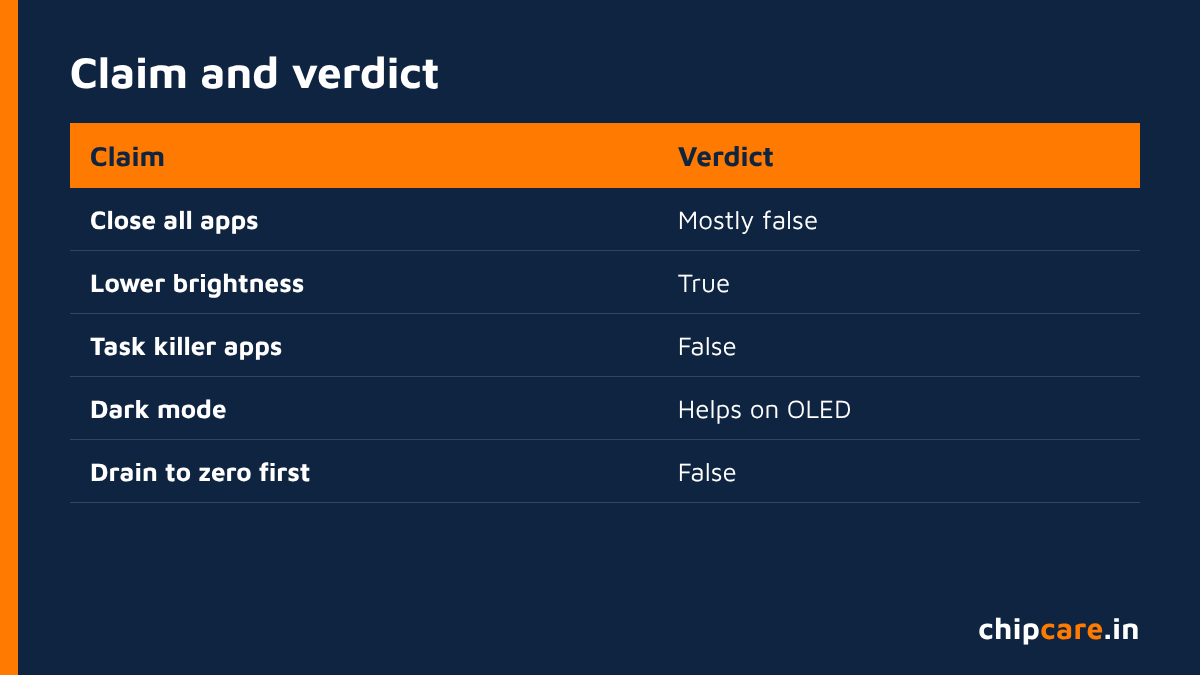
| Claim | Verdict | Why |
|---|---|---|
| Close all apps to save battery | Mostly false | Reopening apps costs more power than leaving them paused |
| Use a task killer app | False | It can make the phone work harder and drain more |
| Lower the screen brightness | True | The screen is the biggest power user |
| Shorten the screen timeout | True | Less time with the screen lit |
| Dark mode saves battery | Depends | It helps on OLED screens, not much on LCD |
| Turn off Wi-Fi and Bluetooth always | Mostly false | Idle radios use little, and Wi-Fi often saves power over mobile data |
| Let the battery hit zero before charging | False | Deep discharge is worse for lithium-ion cells |
| Battery saver mode extends life | True, with trade-offs | It limits performance and background work |
| Airplane mode in weak signal areas | True when you do not need calls | A phone searching for signal drains fast |
The best battery tip is boring: lower the brightness, keep the signal good and do not let the phone get hot.
Step by step: settings that make a real difference
- Lower brightness or use adaptive brightness.
If auto brightness is odd, see phone auto brightness not working fix. - Shorten the screen timeout.
Thirty seconds to a minute is enough for most use. - Check battery use by app.
Look at the usage list in settings and deal with any app that stands out. - Restrict background use for rarely used apps.
Do this for apps that run in the background without need. - Use Wi-Fi where you can.
It usually uses less power than mobile data. - Limit location access.
Allow location only while the app is in use, where possible. - Use battery saver when needed.
Turn it on during a long day out, not all the time.
The charging myths
Older phones with nickel batteries needed full discharge cycles. Lithium-ion phones do not. They prefer partial charges, and they do not have a memory effect. Charging overnight is generally safe with a good charger, because the phone stops charging at full. The real risks are heat and poor chargers, not leaving the phone plugged in. Calibration is also less important than people think, since the percentage display is not much improved by it. See phone battery calibration: myth or fact and fast charging vs normal charging and battery life.
If battery life suddenly drops, do not rely on tips. A swollen or worn battery needs replacing, and saver modes cannot fix that.
When settings are not enough
After two or three years of use, even a well-treated battery loses a good share of its capacity. If the phone needs charging twice a day, shuts down at 20 or 30 percent or runs hot, no setting will bring the battery back. At that point a new battery is the sensible fix and usually the most affordable way to get a phone through another year or two. See phone battery health check: when to replace, phone shuts down at 30 percent fix and phone battery mAh capacity explained. You can browse mobile phone batteries by model.
Dark mode, refresh rate and other modern settings
Dark mode helps on OLED screens because black pixels are off, but the effect depends on how much of the screen is dark and how bright it is. A high refresh rate, such as 120 Hz, makes scrolling smoother and draws more power, and many phones offer an adaptive mode that lowers it when nothing moves. Always-on display uses a small amount of power on OLED phones. Try each for a few days and judge by your own use, because the result varies from phone to phone. See OLED vs LCD vs AMOLED: which is better.
Common mistakes
- Swiping away all recent apps all day.
- Installing a "battery booster" app.
- Running the phone to zero on purpose.
- Blaming the battery when a single app is the drain.
- Leaving the phone in a hot place while it charges.
For repair shops
Before you sell a battery, check usage by app and the signal strength. Many "bad battery" complaints turn out to be an app loop or poor reception. Run a quick health check, show the customer the result and recommend replacement only when the numbers support it. See Android battery health check guide and how to price phone repairs. For background, see the Wikipedia page on power management.
Reading the battery usage screen
The usage list in settings shows which apps use the most power, and the screen usually sits at the top. If a single app is near the top with the screen off, that app is worth a closer look. Check for an update, limit its background activity or remove it. A navigation or video app at the top after a long trip is normal. A messaging or shopping app at the top with no use is not.
Frequently asked questions
Does closing apps save battery?
Usually not. Reopening costs more power than leaving apps paused.
Is it bad to charge overnight?
Not with a good charger. The phone stops at full. Heat is the real risk.
Does dark mode save battery?
On OLED screens, yes. On LCD screens the effect is small.
Should I use battery saver all the time?
No. It limits performance. Use it when you need the extra hours.
Should I let the battery drain to zero?
No. Lithium-ion batteries prefer partial charges.
When should I replace the battery?
When it drains fast, shuts down early or the phone runs hot after normal use.


