

OnePlus built its reputation on charging speed. Dash, Warp and SuperVOOC turned a flat battery into a full one in a short lunch break. That speed comes from engineering inside the battery itself, and it changes how a replacement should be chosen. A cheap, mismatched cell on a fast-charging OnePlus is not just a poor battery. It can be an unsafe one. This guide explains what is special about OnePlus batteries and how to replace one properly.
How fast charging shapes the battery
To charge quickly without overheating, many fast-charging phones split the battery into two cells that charge in parallel, each taking part of the current. The result is less heat in each cell than one large cell would make at the same speed. Many OnePlus models use this design or a similar one. The practical effect is that the battery, its protection circuit and the charger work as a system. If one part is wrong, the whole system suffers.
That is why we recommend a replacement battery that is made for your exact OnePlus model, and a charger that is made for fast charging. For the background on how lithium batteries behave under stress, see the page on lithium-ion batteries.
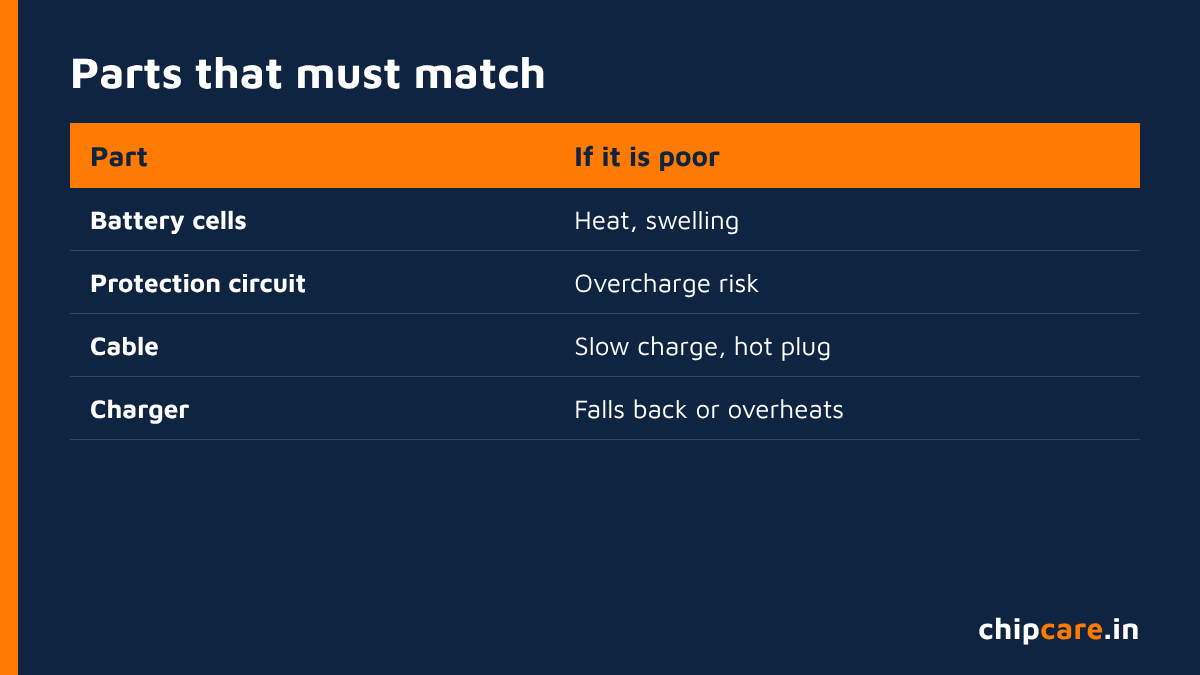
The parts that must work together
| Part | Role | What goes wrong if it is poor |
|---|---|---|
| Battery cells | Store energy, share the charge | Heat, swelling, fast capacity loss |
| Protection circuit | Limits current, voltage and temperature | Overcharging risk, random shutdowns |
| Cable | Carries high current safely | Slow charging, heat at the plug |
| Charger | Delivers matching power | Falls back to slow charge or overheats |
| Charging port | Passes current to the phone | Loose or burnt contacts |
If the phone charges slowly after a battery change, the problem may be the cable, the charger or the port, not the battery. Our guides to phone not charging fixes and charging port problems help you work it out.
On a fast-charging phone, the battery is a safety component. Treat it like one.
Signs your OnePlus battery has worn out
The same signs apply as on any phone, but fast charging can hide the problem for a while because charging is so quick. Look for early shutdowns, heat during charging, a battery that falls faster than before and a charge that stops earlier than it should. If the back is lifting or the screen is bulging, stop using the phone and read swollen battery dangers. Our battery health guide shows how to check.
Choosing a replacement
- Match the model. Check the code on your old battery or the model number in Settings, then About phone. Browse the OnePlus mobile batteries by model.
- Realistic capacity. If a seller promises more than the original in the same space, be careful. See mAh explained.
- Proper protection circuit. Essential on fast-charging designs.
- Clear labelling. Look for batch codes and consistent printing, and read how to spot a fake battery.
- Warranty. A seller who stands behind the part gives it in writing.
Charging habits after the replacement
- Use the correct charger and cable.
A matched fast charger gets the full benefit and the right safety behaviour. A random adapter may not. - Avoid heat.
Remove thick cases while charging. Do not charge under a pillow or in a hot car. - Do not use the phone heavily while charging.
Gaming while charging adds heat from two sources. - Use slower charging when you can.
Overnight charging does not need maximum speed. If your phone has an optimised or night charging option, use it. - Keep the charge in a comfortable range.
Avoid running to zero or sitting at 100 percent for days.
Our guide to fast charging vs normal charging explains how speed and heat affect life, and the guidance from Battery University applies to every lithium battery.
Fitting the battery
OnePlus phones are built tightly, and batteries can be glued under the back glass or beneath the board. Heat, pull tabs and patience are needed. If you want to attempt it, read our home replacement guide and the page on non-removable batteries, and use the correct tools. For a phone with a dual-cell battery, handle both cells with care, and follow the connector layout exactly.
Safety: if the phone has been dropped, is hot, smells odd or has a bulging back, do not try to open it yourself. Put it on a non-flammable surface away from other items and take it to a professional.
If the screen is cracked too
A OnePlus that needs a battery may also need a screen. Doing both at once avoids opening the phone twice. See our OnePlus screen replacement cost guide. Also remember to dispose of the old battery safely. Our guide on disposing of old batteries in India explains how.
Find your OnePlus battery
Match your model, compare grades and read the warranty.
Why a cheap battery is a bad idea on a fast-charging phone
On a phone that charges slowly, a mediocre battery wastes your money. On a phone that charges very quickly, a mediocre battery can waste more than that. The cell has to accept high current, share it between its internal parts and cut off safely if something goes wrong. A cheap cell with a weak protection circuit may do none of those well. You might not notice at first, because the phone seems to charge fine. The cost shows up as extra heat, fast loss of capacity or, in the worst case, swelling.
The practical advice is simple. Spend a little more on a battery with a clear model code, honest capacity and a written warranty. Pair it with a good cable and charger. If a seller offers a price that is far below the rest of the market, ask why. And if the battery gets hot in the first few days, do not wait to see what happens. Unplug the phone, let it cool and have the battery tested.
A good battery on a fast-charging OnePlus is a very good experience. The phone charges quickly, stays cool and lasts the day. A poor one gives you the opposite. The difference is small in the shop and large in daily life.
Frequently asked questions
Why do OnePlus phones charge so fast?
They use a high-current charging system, and many models use a battery split into cells that charge together, which reduces heat. The battery, cable and charger are designed to work as a set.
Can I use any battery in my OnePlus?
No. Use a battery made for your exact model, with a proper protection circuit. A wrong or poor-quality cell can charge slowly, run hot or be unsafe.
Will fast charging still work after a replacement?
Yes, if the battery, charger and cable are compatible. Use a matched charger and cable, and check that the port is clean and undamaged.
How do I make my OnePlus battery last longer?
Avoid heat, remove thick cases while charging, do not use the phone heavily during charging and use slower charging overnight when you can.
Is it safe to replace a OnePlus battery at home?
It carries risk, because of strong adhesive and tight builds. If you are not confident, use a professional.
What if my new battery gets hot?
Stop charging and check the charger, cable and port. If the battery itself is hot, unplug it and have it checked. Do not keep using a hot battery.


