The MacBook trackpad does not click. Or it clicks only at the bottom, feels stiff, sounds odd or has become a raised bump under the surface. On newer MacBooks the trackpad does not move at all. It is a solid panel with a small motor, called a haptic engine, that creates the click feel, so a trackpad that does not click can be a settings issue, a software fault or a failing part. On older models with a physical hinge, a swollen battery pressing on the trackpad is a common and serious cause. This guide explains how to tell the types apart, what to check and what the repair looks like.
Know which trackpad you have
Older MacBooks have a trackpad that moves down at the front and clicks, like a button. Newer MacBooks use a Force Touch trackpad that stays still and uses a motor to fake the click, so the feel is the same everywhere on the surface. If a trackpad of the first type does not click, the hinge, the switch or something under it is at fault. If a trackpad of the second type does not click, the motor, the sensor or the software may be at fault. You can tell which you have by powering the MacBook off and pressing the trackpad. If it still clicks when off, it is the physical type. If it goes dead and silent, it is the haptic type. See laptop trackpad not working fix for general laptop trackpad problems.
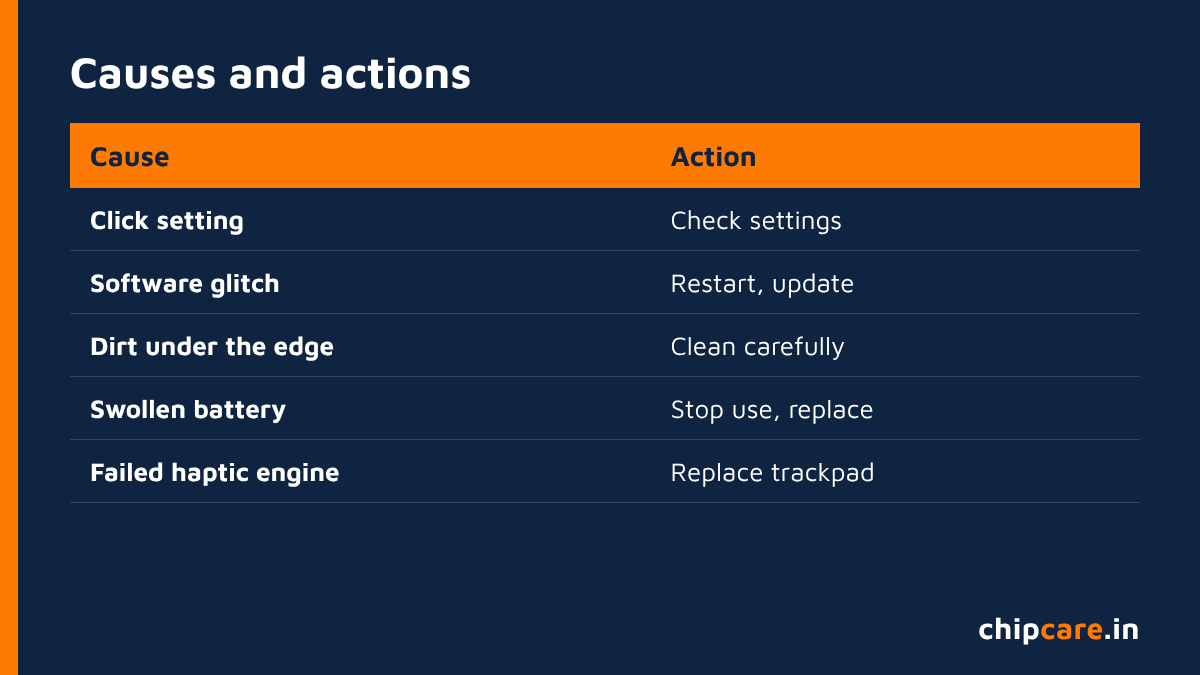
Causes and checks
| Cause | Clue | Action |
|---|---|---|
| Click setting or accessibility option | No click feel, tracking works | Check trackpad settings |
| Software glitch | Started after an update | Restart, update, reset settings |
| Dirt or debris under the edge | Click is stiff or uneven | Clean carefully around the edge |
| Swollen battery | Trackpad raised, case bulges, uneven fit | Stop use and replace the battery |
| Failed haptic engine | Silent trackpad, tracking works | Replace the trackpad assembly |
| Damaged trackpad cable | Intermittent faults | Technician check of the connector |
| Liquid damage | Odd behaviour after a spill | Technician inspection |
If the trackpad has risen above the case or the lid will not close flat, stop using the MacBook and have the battery checked.
Step by step: what to check
- Look at the body first.
Place the MacBook on a flat table. Check for a raised trackpad, a bulging case or a rocking base. If you see these, stop and read the safety note below. - Check trackpad settings.
Look at the click strength and tap settings and the accessibility options. - Restart and update.
Install updates. Try resetting the system controller or settings according to Apple's guidance for your model. - Clean around the edge.
Use a soft brush and a little compressed air at a safe distance. Do not use liquids. - Test with an external mouse.
If the mouse works fine, the fault is in the trackpad area. - Book a service check.
If the settings are right and there is no swelling, a trackpad or cable fault is likely.
The battery danger
On many MacBooks the trackpad sits directly above the battery. A swelling battery pushes the trackpad upwards, makes the click feel hard, stiff or stuck and can crack the case or the trackpad glass. This is a safety issue because a swollen lithium cell can ignite if punctured or crushed. Do not press down on a raised trackpad, do not try to flatten it and do not charge the laptop if you see swelling. Have the battery replaced by a technician as soon as you can, and dispose of the old one properly. See MacBook battery replacement cost in India, swollen battery dangers and what to do and how to dispose of old batteries in India.
A raised trackpad is a warning, not a cosmetic fault. Switch the MacBook off, unplug it and get the battery checked.
The repair
For a haptic trackpad, the repair is to replace the trackpad assembly, which includes the sensor and motor. On many models the battery must be removed to reach the trackpad, so the technician checks the battery at the same time and replaces it if it is worn. For a physical trackpad, the technician may clean or replace the hinge and the switch, or replace the whole unit. The cost relative to other MacBook repairs is moderate, and it is usually worth doing on a healthy MacBook. See MacBook not charging fixes and MacBook screen replacement cost in India. You can browse laptop trackpads and laptop batteries.
Caring for a MacBook trackpad
Do not leave objects, such as chargers or pens, on the keyboard when you close the lid, as they press on the trackpad and screen. Keep liquids away. Do not use harsh cleaners on the surface. Check the battery health in system settings now and then, and replace a battery that is worn before it begins to swell. If you use the MacBook plugged in for months, a battery with a service flag deserves attention.
Common mistakes
- Pressing hard on a raised trackpad.
- Continuing to charge a MacBook with a swollen battery.
- Replacing the trackpad without checking the battery.
- Using liquid cleaners on the trackpad edge.
- Assuming a silent trackpad is only a setting.
For repair shops
Always inspect the battery on a MacBook with a trackpad complaint, and tell the customer if it is swollen before you quote. Use plastic tools, remove the battery with care and keep a fire-safe tray on the bench. Test click, tap and drag after the repair. See ESD-safe repair basics. For background, see the Wikipedia page on touchpads.
Trackpad settings worth checking
Open the trackpad settings and check the click setting, the tap to click option and the tracking speed. Some people turn off tap to click and then forget, which feels like a broken trackpad. Try a different click strength setting and test again. Check the accessibility options for a trackpad or mouse feature that changes how clicks work. If the settings are normal and the pad still feels dead or stiff, move on to the hardware checks.
What to tell the technician
Describe when the problem began, whether the laptop was dropped or exposed to liquid and whether you noticed any change in how the case sits on a table. Mention whether the battery health is low, and whether the laptop has had a battery service message. These details help the technician decide quickly whether to open the laptop and check the battery first. If you have an older laptop with a swollen battery, tell the shop before you hand it over so they can handle it safely.
Frequently asked questions
Why is my MacBook trackpad not clicking?
Settings, software, dirt, a failed haptic motor or a swollen battery can all cause it.
How do I know if the battery is swollen?
The trackpad looks raised, the case bulges or the MacBook rocks on a flat surface.
Is it safe to use a swollen MacBook?
No. Stop using it and get the battery replaced.
Can the click be fixed in settings?
If it is only a setting, yes. If the trackpad is silent, it is likely hardware.
Does the trackpad need replacing?
If the haptic engine or sensor has failed, yes. Check the battery at the same time.
Can I use an external mouse meanwhile?
Yes, but do not ignore a raised trackpad.