A MacBook that no longer lasts a working day, or a message in System Settings that says "Service Recommended", means the battery is nearing the end of its life. What replacement costs depends on the model and year, whether you go to Apple, an authorised provider or an independent repair shop, and the part grade. This guide explains how to check your battery, what drives the price and how to choose a replacement safely.
How to check if your MacBook battery needs replacing
Do not replace a battery on feel alone. Your Mac can tell you how worn it is. Hold the Option key, click the Apple menu and choose System Information. Select Power in the sidebar, and under Battery Information you will see the cycle count and the condition. Apple documents this in its guide to determining battery cycle count for Mac laptops, including the maximum cycle count for each model, which is 1,000 for many recent models. On newer versions of macOS you can also open System Settings, then Battery, to see battery health.
Apple says the battery is designed to retain up to 80 percent of its original capacity at its maximum cycle count, and recommends replacing it when it reaches that figure. A battery that is far past its maximum cycle count, shows "Service Recommended", or swells is a candidate for replacement.
What drives MacBook battery replacement cost
- Model and year. A battery is specific to a model generation. A 2015 MacBook Air battery will not fit a 2020 one, and prices differ between them.
- Where you get it done. The official route is the most expensive and the most predictable. Independent shops are cheaper and more varied.
- Part grade. An original or OEM pack costs more than a compatible pack, and quality differs.
- Labour. Some MacBooks have the battery glued in place, which takes longer to remove than a battery held by screws alone.
- Extra work. Swollen batteries can damage the trackpad or case, which adds to the bill.
Because Apple's own service prices change by model and region, check the current price on its website for your exact MacBook, and compare it with independent quotes. We have not listed a fixed figure here, since a number that is correct today may be out of date next month.
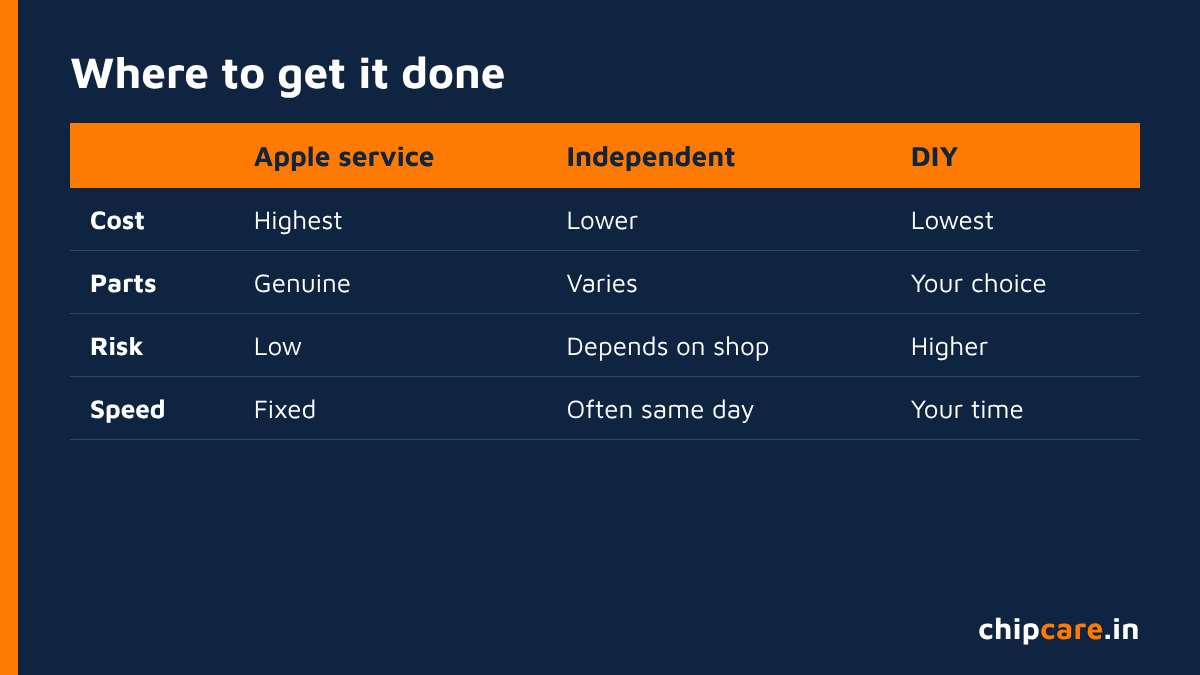
Official or independent: how the options compare
| Factor | Apple or authorised service | Independent repair shop | DIY |
|---|---|---|---|
| Cost | Highest | Lower | Lowest (part and tools) |
| Part quality | Apple genuine parts | Original, OEM or compatible | Your choice |
| Warranty | Apple's service warranty | Shop-specific | Part warranty only |
| Risk | Low | Depends on the shop | Higher; adhesive and cables are delicate |
| Turnaround | Fixed, sometimes days | Often same day | Your own time |
Choosing the right MacBook battery
MacBook batteries are model-specific, so do not buy by screen size alone. Find your model identifier and year in Apple menu, About This Mac, or on the underside of the laptop, and match it to the listing. Start with MacBook batteries, or go straight to MacBook Air batteries or MacBook Pro batteries. Check the part type and warranty on each listing, and compare capacity with the original specification.
Good to know: If your MacBook uses the original adapter and still will not charge, the adapter or cable may be the fault instead of the battery. See our MacBook adapters and test with a known good one first.
Is it a battery problem or a charging problem?
Several different faults look like a dying battery. A worn adapter, a damaged cable or a dirty charging port can all stop a MacBook from charging properly. Read our guide to laptops that will not charge for the checks that apply to any laptop, and how to check laptop battery health for the wider picture. Also reset the System Management Controller on Intel Macs or restart on Apple silicon models, as a software glitch can mimic battery failure.
Check the cycle count before you pay for anything. It tells you whether the battery is really worn out.
Replacing it safely
MacBook batteries are lithium-ion packs, and they need careful handling; read more about their behaviour in this overview of lithium-ion batteries. Many models use adhesive strips that hold the pack in place, and pulling too hard can puncture a cell. Use the right tools, power the laptop off completely, disconnect the battery before doing anything else and never bend or pierce the pack. If you are not confident, use a technician. Our laptop repairing tools include pry tools and screwdrivers suited to Apple's pentalobe and Torx screws, but always check that the kit lists your model.
A swollen battery should be treated as urgent. Stop using the Mac, do not charge it and have the pack removed. Take the old battery to an e-waste or battery recycling point, not the household bin.
Getting the most from a new battery
- Turn on optimised battery charging, which learns your routine and limits time at 100 percent.
- Avoid leaving the Mac in a hot car or running heavy tasks on a soft surface.
- Use an adapter with the right wattage for your model.
- Keep macOS updated for battery and power fixes.
- Do not store the Mac fully drained for months.
If the laptop is also slow, an upgrade to the storage or a clean-up of the system can help; see how to speed up a slow laptop, noting that on most modern MacBooks the memory and storage are not user-upgradeable.
Find a MacBook battery
Search by model and year. Every listing shows the part type and warranty.
Questions to ask a repair provider
Whoever does the work, a few questions give you a clear picture. Which battery will be fitted, and is it original, OEM or compatible? What is the total price, including labour and any adhesive or screws? How long will the repair take, and will it be done while you wait? What warranty comes with the part and the labour? Will the shop check the charging port and the adapter at the same time? Clear, direct answers are a good sign. Vague ones are a reason to try another shop. Also back up your data before you hand the laptop over, even though a battery swap should not touch your files.
Frequently asked questions
How much does a MacBook battery replacement cost in India?
The cost depends on the model, year, part grade and where you have it done. Check Apple's current service price for your exact model and compare it with independent quotes and the price of a replacement battery.
How do I check my MacBook battery health?
Hold Option, click the Apple menu, open System Information and select Power to see the cycle count and condition. On newer macOS you can also check System Settings, then Battery.
When should I replace my MacBook battery?
Consider it when the cycle count reaches the maximum for your model, the condition says Service Recommended, runtime has dropped sharply or the battery is swollen.
Can I replace a MacBook battery myself?
On some models, yes, but many use adhesive and delicate cables, and a punctured cell is dangerous. If you are unsure, use a professional.
Will a new battery make my MacBook faster?
It will restore runtime and can help if an old battery limited peak performance, but it will not change how fast the processor runs.
How long does a MacBook battery last?
Many MacBook batteries reach their maximum cycle count after a few years of daily use. Heat and charging habits change how quickly that happens.