
Deep inside most laptops sits a small round battery the size of a coin. It is the CMOS battery, also called the RTC battery, and its only job is to keep the clock and the stored BIOS settings alive while the laptop is switched off and unplugged. When it dies, the laptop can start to behave strangely: the date and time reset, the system asks to press a key to continue, boot order changes or the laptop will not start properly. The fix is small and cheap, but it needs care, because on many modern laptops the battery is hidden under the base or soldered to a small cable. This guide explains the signs, how to confirm the cause and how the replacement works.
What the CMOS battery does
When you switch off a laptop and remove the charger, the main battery stops powering the clock chip and the memory that stores BIOS settings. The CMOS battery takes over with a trickle of current. It is not charged by you directly, and it lasts for years because it supplies very little power. When the cell weakens, the laptop forgets the date and time, and may forget settings such as boot order, which can stop the operating system from starting. Many people think the main battery or the operating system is at fault, so they reinstall software when a few rupees' worth of battery was the problem.
Signs of a weak CMOS battery
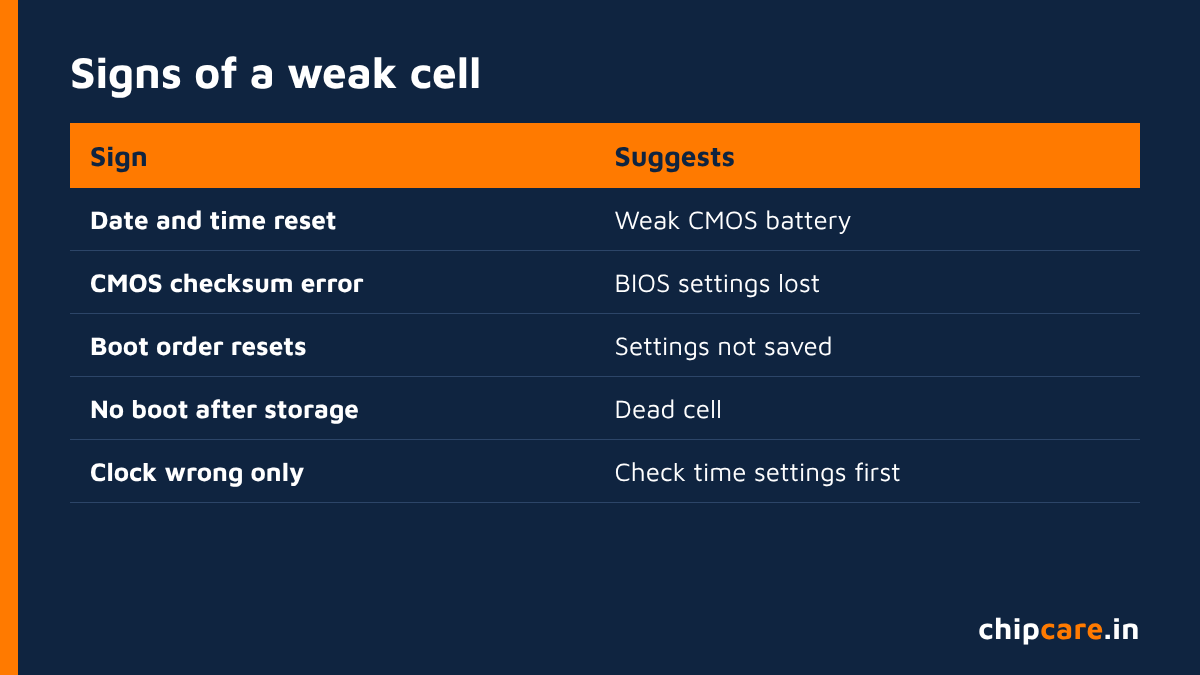
| Sign | What it suggests | Check |
|---|---|---|
| Date and time reset after power-off | Weak CMOS battery | Set the time, shut down, unplug, wait, power on |
| "CMOS checksum error" or similar on start | BIOS settings lost | Replace the battery, reload defaults |
| Boot order resets | Settings not saved | Check the BIOS after each shutdown |
| Laptop will not boot after a long storage | Dead cell | Replace and reset the BIOS |
| Clock wrong but BIOS stable | Time zone or sync setting | Check the system time settings first |
A laptop that forgets the time every time it is unplugged is asking for a coin cell, not a new operating system.
Step by step: confirming the cause
- Set the correct date and time.
Do this in the BIOS or in the system settings, with the time sync on. - Shut down and unplug the charger.
Leave the laptop off, with no charger, for several hours or overnight. - Power on and check the clock.
If the date and time are wrong, or a BIOS message appears, the CMOS battery is likely weak. - Check the BIOS settings.
See whether the boot order and other settings have reset to defaults. - Look up your model.
Find where the battery sits and what type it is. Many use a coin cell, often a 3-volt type, but check your model.
How the replacement works
On older laptops, the coin cell sits in a holder under a small cover, so the job takes minutes. On newer laptops, it is usually under the base cover, attached to a short cable with a small plug, held by a sticker or a clip. The technician powers off the laptop, disconnects the main battery, removes the base cover, unplugs the old cell and plugs in the new one. Then the BIOS is set to the correct date, time and boot order. On some models, the cell is soldered to the board and needs a more careful repair, or a replacement cell on a cable is added. Always match the type and the voltage, and use a good-quality cell. Browse laptop spare parts and laptop repairing tools.
Disconnect the main battery and unplug the charger first. Never short a coin cell, and do not use metal tools to lever it out, because a short can heat or damage the cell and the board. Dispose of the old cell properly. See how to dispose of old batteries in India and ESD-safe repair basics.
Common mistakes
- Reinstalling the operating system when the CMOS cell was dead.
- Fitting the wrong type or voltage of cell.
- Skipping the main battery disconnect.
- Forgetting to set the BIOS date, time and boot order afterwards.
- Throwing the old cell into household waste.
Other causes of a time reset
Not every wrong clock means a dead cell. A wrong time zone, a failed network time sync, a dual-boot setup that handles the hardware clock differently or a recent BIOS update can all cause the same sign. Check these before opening the laptop. If the clock holds for days when the laptop is plugged in but resets after a long shutdown, the CMOS cell is a strong suspect. If the laptop will not start at all, see laptop won't turn on, because the cause could be the charger, the main battery or the board, and see how to choose a laptop charger adapter for the power side.
For repair shops, check the date and time at intake and again at hand-over on every laptop, since a wrong clock breaks security certificates and updates and is easy to fix. Keep common coin cells and cables in stock. See repair shop inventory management. For background, see the Wikipedia page on nonvolatile BIOS memory.
Why laptops stored for months fail to start
A laptop that sits in a cupboard for a year is a classic case. The main battery drains, and the CMOS cell may also run flat, so the BIOS forgets its settings. When the owner finally plugs it in, the screen stays black or shows a settings error, and the owner assumes the laptop has died. In many cases, replacing the coin cell and reloading default BIOS settings brings it back. Before you do that, charge the main battery for a while with the original charger, because a deeply drained main battery can also stop the laptop from starting.
If you store a laptop for a long time, charge it to about half, switch it off, unplug it and keep it in a cool, dry place. Power it on every few months for a short time. This keeps both batteries healthy and lets you spot problems early. A fresh coin cell is cheap, and replacing it before it fails is a sensible habit on an older laptop that you rely on for work.
After the replacement, set the clock accurately and enable network time sync, which keeps the time right even if the cell is weak. This hides a fading cell, so do not rely on sync alone to judge the battery.
Frequently asked questions
What is a laptop CMOS battery?
A small coin cell that keeps the clock and BIOS settings alive when the laptop is off and unplugged.
How do I know it has failed?
The date and time reset, a BIOS error appears or settings are lost after a power-off.
How long does it last?
Several years, but less if the laptop is left unused for long periods.
Can I replace it myself?
On many laptops, yes, with care. On others it sits under the base cover or is soldered, and a technician is safer.
Will a dead cell stop the laptop from starting?
It can, if BIOS settings are lost. Replace the cell and reload the settings.
How do I dispose of the old cell?
Take it to a battery collection point. Do not throw it in household waste.