

Google Pixel phones age gracefully in software, but their batteries age like everyone else's. After two or three years of daily use, many Pixel owners notice that the battery drains faster, the phone heats up when charging and, in some cases, the back or screen starts to lift slightly. A battery replacement can bring a Pixel back to life, but the job is delicate and the stakes are higher than for a cheap phone. This guide explains when a Pixel battery should be replaced, how the job works, what affects the cost and how to avoid the common mistakes.
Check the battery's health first
Android phones show battery health in different ways, and Pixels offer some built-in information. Many Pixel models have a battery health option in Settings that reports the health of the battery and its capacity in relation to the original. If your phone does not, other methods can give an estimate, and we describe them in our guide on how to check battery health on Android. A battery that has dropped well below its original capacity, or that causes shutdowns, is ready for replacement. Our guide on when to replace a phone battery offers a practical rule.
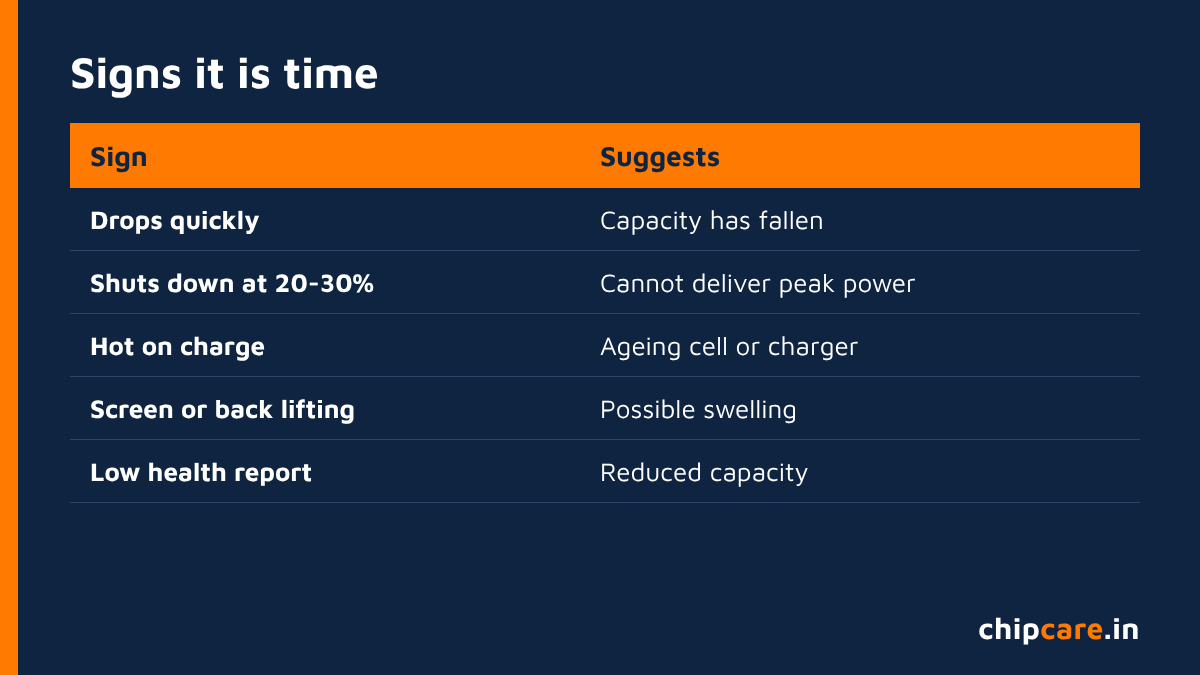
Signs it is time
| Sign | What it suggests |
|---|---|
| Battery drops quickly through the day | Capacity has fallen |
| Phone shuts down at 20 to 30 percent | Cell cannot deliver peak power |
| Phone gets hot on charge | Ageing cell or charger problem |
| Screen or back lifting at the edge | Possible swelling. Stop using the phone |
| Battery health report is low | Reduced capacity |
Swelling is not a "later" problem. A phone with a bulging battery should be switched off and handled by a professional.
How the repair works
Pixel phones are sealed, and the battery sits under the back panel or, on some designs, under the display. The adhesive is strong, and the glass can crack if heat and force are misjudged. The battery is also connected by a delicate flex cable. A technician will heat the phone, cut the adhesive, disconnect the battery, release the old cell and fit the new one with fresh adhesive before resealing. On some models, the display must be lifted to reach the battery, which increases the risk to the screen. This is why shops price Pixel battery replacements higher than simple phones, and why you should choose someone with experience.
What affects the cost
- Model and generation. Newer models are harder to open and their parts cost more.
- Battery grade. Original cells cost more and last longer than compatible ones. See original vs OEM vs compatible.
- Access method. Screen-side access is slower and riskier than back access.
- Availability. Parts for some Pixel models may need to be ordered.
- Extras. New back glass, seals or adhesive may be needed. Ask whether water resistance can be restored, because a resealed phone may not be as water resistant as it was.
Step by step: planning a safe replacement
- Back up your phone.
Use your Google account backup and copy photos. See how to back up before repair. - Choose a shop with Pixel experience.
Ask how many Pixel batteries they have fitted and which parts they use. - Ask about the battery grade and warranty.
Get it in writing. - Ask about water resistance.
A resealed phone may not meet the original rating, so ask what they do to reseal it. - Test after the repair.
Check charging, heat, percentage behaviour and that the screen and back sit flush.
Do not attempt this without experience. A punctured battery can ignite. If you want to learn, practise on an old, inexpensive phone first, and use plastic tools and safety glasses. For the basics, read how to replace a phone battery at home.
After the replacement
Pair the new battery with a charger that suits the phone. Our guide on choosing the best charger for an Android phone explains what to look for, and phone heating while charging explains what is normal. Avoid heat, since high temperature is the main enemy of battery life. If your phone also has a cracked display, read our Pixel screen replacement guide and think about combining both repairs to save on labour.
You can browse Google Pixel batteries by model. For some background, see the page on the lithium-ion battery.
Common mistakes with Pixel batteries
- Using a generic shop for a first-time Pixel repair. These phones are tightly built, and a shop without experience can crack the glass or tear a flex cable.
- Choosing the cheapest cell. A low-grade battery may have lower capacity than advertised and age quickly, so you pay for the labour twice.
- Not asking about sealing. A poorly resealed phone can let in dust and moisture, and its water resistance may be reduced.
- Ignoring a swollen battery. A bulging cell can push the screen away from the frame and damage the display. Replace it promptly.
- Forgetting the backup. A repair should not touch your data, but a phone that fails to start afterwards is a stressful moment without a backup.
Warranty and import considerations
If your Pixel was bought abroad or through a grey channel, official service in India may not be available. An unauthorised repair can affect any remaining manufacturer warranty, so read the terms before you open the phone. For phones that are out of warranty, the decision is simpler, and a quality independent repair usually makes sense. Keep the invoice from the shop and the battery's details, and ask for a written warranty on the part and the labour. It is also worth asking whether the shop calibrates or resets the battery statistics after the swap, because some phones keep old usage data that can make the percentage look odd for the first few days.
If the percentage seems off after a replacement, use the phone normally through a few charge cycles. Do not rush back to the shop on day one, but do not ignore real problems such as heat or fast drain either. A good battery should settle down within a few days, and your battery health report should reflect the new cell.
Frequently asked questions
How do I know my Pixel battery needs replacing?
Fast drain, shutdowns at moderate charge levels, heat on charge, swelling or a low health report are all signs.
Is a Pixel battery replacement safe to do at home?
It is a delicate job with a risk of cracked glass and a punctured battery. A professional is a safer choice.
Will my phone stay water resistant after the repair?
Not necessarily. Opening the phone can weaken the original seals. Ask the shop how they reseal it.
Does the battery grade matter?
Yes. Original or high-grade cells last longer and are safer than cheap ones.
Can I replace the battery and screen together?
Yes, and it often saves labour because the phone is already open.
What should I do if the battery is swollen?
Switch off the phone, do not charge it and take it to a professional for replacement.


