

Asus makes two very different kinds of phone: the Zenfone, a compact flagship-style phone, and the ROG Phone, a gaming phone with a high refresh-rate AMOLED panel, strong touch response and extra features such as side triggers. Both are less common in repair shops than mainstream brands, so a cracked Asus screen can lead to a hunt for parts and a wide range of quotes. This guide explains what is special about Asus panels, how to match the right part for a ROG or Zenfone, what to test after the repair and when it is worth repairing a gaming phone.
ROG Phone and Zenfone are not the same repair
A ROG Phone is built for long gaming sessions. Its screen supports a high refresh rate and a fast touch response, and the phone often has extra sensors and a more complex frame because of its side triggers and cooling design. A Zenfone is a more conventional phone, usually smaller, with a standard AMOLED panel. The two use different screens and different repair steps, so telling the shop the exact name and generation matters. A ROG Phone 6 and a ROG Phone 7, for example, are different phones, and so are two different Zenfone generations. Check the model on the box, in Settings or on the back. See how to identify phone screen model compatibility.
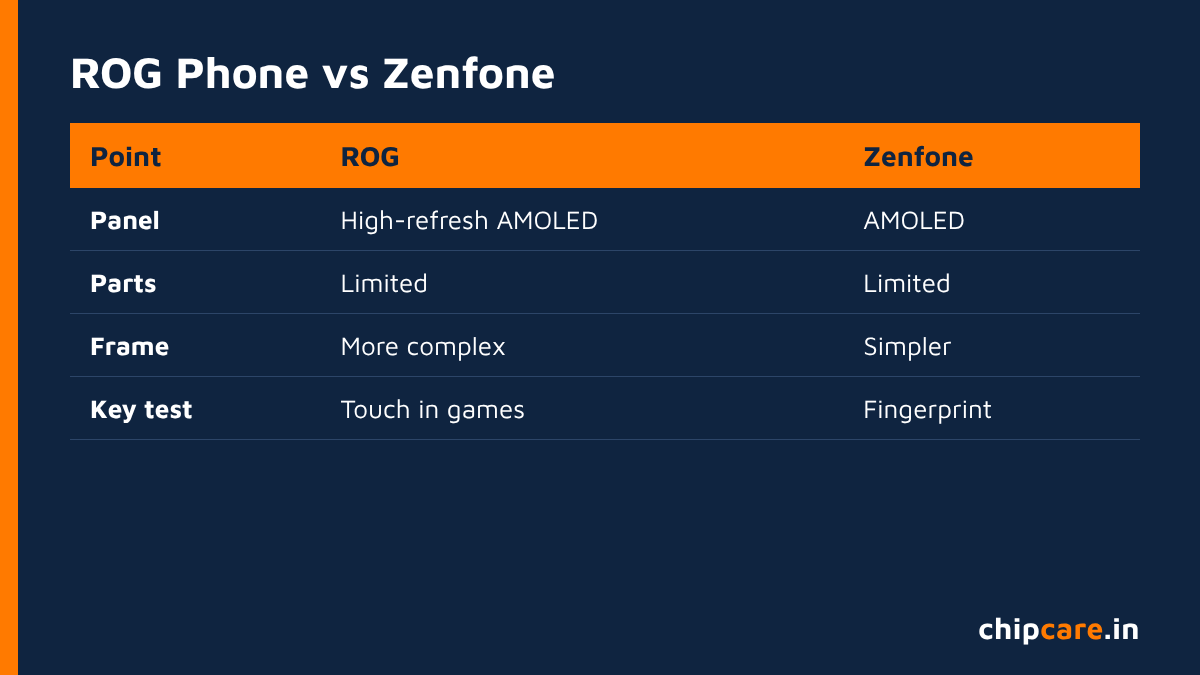
ROG Phone vs Zenfone: what to expect
| Point | ROG Phone | Zenfone |
|---|---|---|
| Panel | High refresh-rate AMOLED, fast touch | AMOLED, standard to high refresh |
| Part availability | Limited, may need ordering | Limited, varies by generation |
| Frame complexity | More complex, side triggers | Simpler |
| Cost level | Upper band | Middle to upper band |
| Key test | Touch response in fast games | Fingerprint and brightness |
On a gaming phone, touch response is the feature you bought. Make sure the replacement panel keeps it.
Step by step: planning the repair
- Identify the exact model and generation.
Do not rely on "Asus phone". Name the series and generation. - Ask about stock and grade.
Original, compatible or used, with a written date if the part must be ordered. - Ask about touch and refresh rate.
Does the panel support the same refresh rate and touch response? - Check the battery and cooling parts.
Gaming phones run hot, and a tired battery is common. See phone battery health check. - Back up your data.
See how to back up a phone before repair. - Test in a fast game.
Before you leave, run a game or a touch test to check responsiveness across the whole screen.
Is it worth repairing a gaming phone?
For a recent ROG Phone, usually yes, because the phone is still capable and a new gaming phone is costly. For an older model, weigh the screen cost against what a newer mid-range phone offers. Gaming phones also tend to have heavy battery wear, since long sessions and fast charging age cells quickly, so a screen repair is a good moment to check the battery and consider replacing it. See phone overheating causes and fixes and fast charging vs normal charging and battery life. When you compare the repair cost with replacement, remember to count the accessories you already own: cooler clips, controllers and cases. You can browse Asus phone screens by model.
Handle the side triggers and ports with care. Some ROG Phones have extra ports and sensors in the frame. A careless repair can damage these, so choose a technician who has opened your model before and ask them about it.
What else can go wrong with a gaming screen
Besides cracks, high-refresh AMOLED panels can show faint burn-in after long sessions with static elements such as a health bar or a button overlay. Green or pink lines, flicker at low brightness and touch dead zones can also appear with age or after a drop. If your fault is not a crack, the fix may differ. See phone screen burn-in and ghost image fix, screen flickering and green line fix and phone touch delay or lag. To reduce wear, lower the brightness a little, use dark mode where possible and avoid leaving static images on screen for hours.
Common mistakes
- Not naming the exact generation of the phone.
- Accepting a panel that does not support the original refresh rate.
- Skipping the battery check on a heavily used gaming phone.
- Not testing touch in a real game.
- Letting an inexperienced shop open a complex frame.
For repair shops
Gaming phones attract customers who know what they want and will notice anything less. Be honest about parts, test responsiveness, and record the supplier. Keep a note of which models you have repaired and what went well. See how to test phone parts before installing and how to price phone repairs. For background, see the Wikipedia page on ROG Phone.
Cooling, cases and accessories after the repair
Gaming phones rely on a mix of internal cooling and clip-on accessories. A screen repair involves opening the phone, so ask the technician to check that thermal pads, graphite sheets and any copper plates are put back where they were. A missing or misplaced pad does not show up on day one, but it can raise temperatures during a long session and shorten the life of the battery and the panel. If your phone uses a cooler fan accessory, test it after the repair and check that it still clips on and connects firmly.
Cases matter as well. Some ROG cases leave openings for ports, triggers and vents, and a poorly fitting case can trap heat or press on side buttons. If your screen cracked in a drop, a case with raised edges and corner protection is a sensible upgrade. Pick one that keeps airflow and does not block the triggers. See how to choose a phone case for what to look for.
Finally, ask for a short stress test before you leave: a few minutes of a demanding game or benchmark, with brightness raised, while you check touch, colour and temperature. If the phone behaves as it did before the drop, you can be confident in the repair. If something feels slower, warmer or less responsive, say so on the spot while the technician still has the phone open on the bench.
Frequently asked questions
Can an Asus ROG Phone screen be replaced?
Yes. Parts may need ordering, so ask about availability and grade.
Will a replacement keep the high refresh rate?
Only if the panel supports it. Ask and test after the repair.
Is a ROG repair costlier than a normal phone repair?
Usually, because the panels and frames are more specialised.
Should I replace the battery too?
If it is worn, yes. Gaming phones age batteries quickly.
Are Zenfone screens easier to find?
It varies by generation. Ask the shop about your exact model.
How do I test touch after the repair?
Use a touch test app or a fast game and check the whole screen, including the corners.


