

You tap an icon and nothing happens for a moment. You type, and the letters appear a beat late. You scroll and the screen seems to drag behind your finger. Touch delay is one of the most irritating phone problems, and it is hard to pin down because the cause can be software, accessories or a failing screen. This guide separates the possibilities so that you can fix what is fixable for free and recognise the signs that the display or touch layer needs repair.
First, decide where the lag shows up
The most useful question is whether the delay is everywhere or only in certain apps. If it affects only one or two apps, the problem is almost certainly software, and updating or reinstalling the app is the fix. If it affects the whole phone, including the home screen and settings, the cause is something broader, such as low storage, an outdated system or a hardware problem. If the lag appears only on part of the screen, for example near one edge, suspect the screen or the protector. Keep a note of exactly where and when it happens.
Software and accessory causes
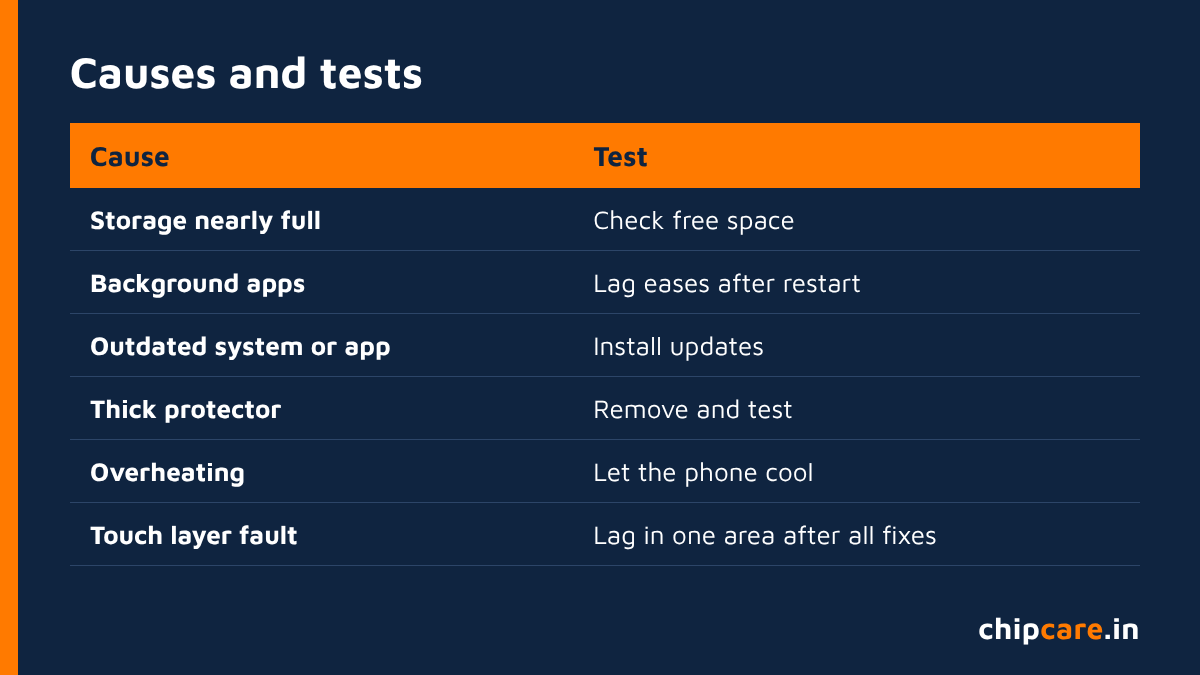
| Cause | How to test | Fix |
|---|---|---|
| Storage nearly full | Check free space in settings | Delete files and unused apps |
| Too many background apps | Lag eases after a restart | Restart and limit background apps |
| Outdated system or app | Lag started after an update, or an update is pending | Install updates |
| Thick or damaged protector | Lag disappears with protector removed | Replace it with a thin, good one |
| Wet or dirty screen | Lag improves after cleaning and drying | Clean with a soft dry cloth |
| Overheating | Phone is hot, lag eases when cool | Let the phone cool, remove the case |
If the phone is hot or almost out of storage, fix those first. Many "touch problems" are really performance problems.
Step by step: free fixes
- Restart the phone.
A restart clears temporary memory and fixes many glitches. - Free up storage.
Aim to have a comfortable amount of free space. Delete old downloads and unused apps. - Install updates.
Update the system and the apps that lag. - Remove the protector.
Test the touch without it. If the lag disappears, change the protector. Our guide on how to apply a screen protector without bubbles helps you fit a new one correctly. - Clean the screen.
Wipe it with a soft, dry cloth. Dry your hands. - Test in safe mode.
If the lag disappears in safe mode, an app is the cause. Remove recently installed apps one at a time. - Use a touch test.
Draw lines across the screen using a touch test app or the developer's pointer location option. Look for gaps or lag in a specific area.
When the hardware is at fault
If the lag stays after the free fixes, the touch layer or the connection to the board may be failing. Signs include delay in one region of the screen, taps that register in the wrong place, random touches or a screen that works fine and then drops for a few seconds. A drop or pressure on the phone can damage the digitiser or loosen the display cable. A badly made replacement screen can also have slow or uneven touch. For related faults, read ghost touch and touchscreen not working.
Repair options are to reseat the display cable, replace the screen or, on very old phones, accept the loss. A technician can test the touch layer and the cable. If a recent replacement screen caused the lag, return to the shop, since a better grade will usually fix it. Our guide on identifying the right replacement screen explains why compatibility matters. You can browse mobile phone displays by model.
Check the battery too. A worn battery can make a phone slow and cause performance throttling. If the phone is old and the battery is weak, the lag may improve after a battery replacement. See when to replace a phone battery.
Common mistakes
- Blaming the screen when storage is full or the phone is overheating.
- Using a thick protector that dulls touch sensitivity.
- Ignoring system updates for months.
- Paying for a new screen without ruling out software causes first.
- Choosing a cheap replacement screen with weak touch response.
Keeping touch responsive
- Keep at least a fifth of the storage free.
- Restart the phone once in a while.
- Close apps you are not using, and uninstall those you never open.
- Use a thin protector and clean the screen regularly.
- Keep the phone cool, and avoid heavy use while charging.
For background on how touch screens work, see the page on the touchscreen.
What a technician checks
A technician will usually start with the same free steps you can do at home, then move to the hardware. They run a touch test across the screen, looking for dead or slow zones, and they check whether the lag follows the phone in safe mode. If the display is suspect, they reseat the display cable, because a loose connector is a cheap fix. If touch is poor only in a band along one edge, the digitiser may be damaged. They will also test the battery and look at the temperature, because throttling can mimic touch lag. If you have had a screen replaced recently, bring the job sheet. A good shop will compare the new panel's touch response with a known-good one and swap it if it is slow.
Do not be afraid to ask for a clear explanation. A reply such as "the touch layer is damaged and cannot be repaired separately" is honest and useful, and a quote that names the part gives you something to compare with other shops. If a shop suggests expensive board repairs for a simple lag, get a second opinion before agreeing.
Finally, keep a short log for a week. Note when the lag happens, what app you were in, whether the phone was hot or charging and how much storage was free. Patterns appear quickly, and they save time whether you solve the problem yourself or hand it to a shop.
Frequently asked questions
Why is my phone touch delayed?
Common causes are low storage, too many background apps, outdated software, a thick protector or heat. Hardware faults in the touch layer are less common but possible.
How can I test if it is the screen or the software?
Restart in safe mode and use a touch test. If the lag goes away in safe mode, an app is the cause. If it stays, suspect hardware.
Can a screen protector cause touch lag?
Yes, a thick or poorly fitted one can. Remove it and test.
Does a full storage slow touch?
Yes. A nearly full phone slows down everything, which feels like touch lag.
When should I replace the screen?
If lag stays in a specific area after all free fixes, or taps register in the wrong place, the touch layer may be failing.
Could the battery cause lag?
A worn battery can lead to throttling and slowdowns. If the battery is old, test it.


