


Poco phones deliver strong specifications for the price, which makes them popular with students, gamers and anyone who wants power without the premium. They also get heavy daily use, and the charging port takes the strain: plugged in at night, tugged during gaming, filled with lint from pockets and bags. When a Poco starts charging slowly, cuts out or needs the cable held at an angle, cleaning may be enough, but sometimes the port is worn and needs replacing. This guide explains how to tell the difference, how to clean safely, what the repair involves and how to test the outcome.
Gaming while charging is hard on the port
Many Poco owners play while the phone is plugged in. The cable pulls on the port every time the phone moves, and the contacts wear. Add pocket lint and the occasional bump, and a port that was firm at purchase can become loose within a year or two. A loose port is more than an inconvenience: poor contact makes charging unreliable and can generate heat at the plug. If you game while charging, use a longer cable, a right-angle plug or a magnetic adapter that takes the strain off the port. See phone heating while charging: what is normal and what is not.
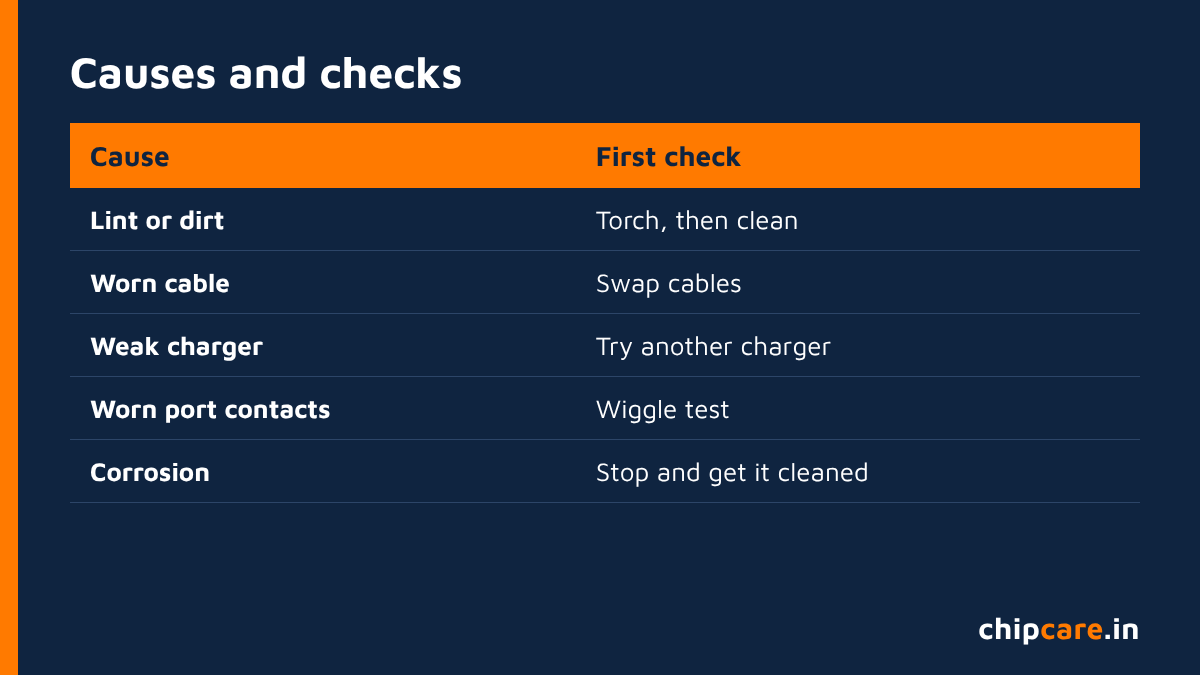
Causes and checks
| Cause | Sign | First check |
|---|---|---|
| Lint or dirt | Plug does not seat fully | Torch, then clean |
| Worn cable | Works with another cable | Swap cables |
| Weak charger | Slow charging, no fast label | Try another charger |
| Worn port contacts | Wobble, cuts out | Wiggle test |
| Bent tongue or pins | Plug will not go in straight | Technician check |
| Corrosion | Green or white residue | Stop and get it cleaned |
If the plug feels loose in the port, a new cable will not fix it for long. The port needs attention.
Step by step: clean, test, repair
- Power off the phone.
Never clean a charging port with the phone on. - Look inside with a torch.
Lint appears as a grey, compacted plug. - Lift lint with a wooden toothpick.
Work gently along the edge. Do not push into the centre tongue. See how to clean a phone charging port. - Test with a good cable and charger.
Try more than one combination. - Check for wobble.
If the plug is still loose, the port is worn. - Book a repair.
A technician replaces the port or its board and tests the result.
The repair, in practice
A technician powers off the phone, opens it, disconnects the battery and inspects the port area. On many Poco models, the port is on a small board that can be swapped with the connection flex. On others, the port is soldered to the main board, and the repair is more skilled and costlier. After fitting, the technician should test charging with a normal charger and a fast charger, check data transfer and run a wiggle test. The same board may carry the microphone and antenna connectors, so test calls, voice recording and signal as well. See phone microphone not working fix and phone network signal drops. You can browse mobile phone charging ports and Poco phone screens. For the battery side, see Poco battery replacement cost in India.
If the port or plug gets hot, stop charging. Heat means poor contact or a damaged cable, and continued use can damage the phone or cause a fire. Use a different cable and get the port checked.
Common mistakes
- Using a damaged cable and blaming the port.
- Pushing metal pins into the port.
- Gaming with the phone hanging from a short cable.
- Ignoring a loose plug until it stops charging altogether.
- Not testing fast charging and the microphone after the repair.
For repair shops
Port repairs are high-volume work. Cleaning and cable tests first often save the customer a replacement and win loyalty. When replacing, test each part, record the supplier and run the full test list after fitting. Advise gaming customers on cables and adapters, because a small recommendation prevents a repeat repair. See how to test phone parts before installing and how to price phone repairs. For background, see the Wikipedia page on Poco.
Cables, adapters and gaming setups
If you play for long sessions while charging, choose accessories that protect the port. A long, flexible cable lets you move the phone without pulling the plug. A right-angle plug keeps the cable out of your hand and the phone's edge. A magnetic adapter, where the plug stays in the port and the cable clips on, moves the wear to a cheap part that you can replace. Whichever you choose, buy from a known brand, because poor adapters can cause heat and slow charging.
Think about heat as well. Gaming warms the phone, and fast charging adds more. If the phone gets very hot, reduce the charging speed by using a slower charger during play, or pause charging until you finish. A cooler phone charges faster, protects the battery and is kinder to the port. Remove the case during long sessions if the phone runs warm.
Finally, learn what a healthy port feels like. The plug should click in with light resistance, stay firm when you touch it and charge at once. If it ever feels gritty, loose or hot, stop and check it. Catching a problem early means a cleaning or a small repair, not a rushed fix when the phone is dead and you need it most. If you are a student or a gamer who relies on the phone every day, a little attention here pays back many times over.
When you ask for a quote, mention how you use the phone: gaming, charging overnight, a bag or a pocket. A technician who knows your habits can suggest the right fix, such as a stronger port, a better cable or a different charging routine, instead of simply replacing the part and waiting for it to fail again. A repair that fits your habits lasts longer than one that ignores them.
Keep the old port if the shop lets you. Seeing worn contacts or bent pins explains the fault and shows that the work was needed, which is useful if you ever wonder whether a repair was fair.
Frequently asked questions
Why does my Poco only charge at an angle?
Lint or a worn port is the likely cause. Clean it first, then test with another cable.
Can I clean my Poco's port myself?
Yes, with the phone off and a wooden toothpick. Avoid metal tools and liquids.
Does gaming while charging damage the port?
It adds wear from cable pull and heat. A longer cable or magnetic adapter helps.
Is a port replacement a big job?
On most models it is a small-part repair, but cost depends on the design.
Will fast charging work after repair?
It should with a good port and a matching charger and cable.
What else should be tested?
The microphone, data transfer and signal, since they may share the same board.


