


The volume buttons are the parts of a phone that get pressed more than almost any other, and they are easy to overlook until one stops responding or gets stuck. Some volume button faults are as simple as a bit of grime under the button. Others involve a worn flex cable or a bent frame. This guide covers why volume buttons fail, how to test them, what you can do without opening the phone and when replacement is the answer.
How the volume buttons work
The volume buttons are usually two small plastic or metal keys on the side of the phone. Behind them sits a flexible cable with tiny contacts, each of which closes a circuit when the key presses it. Some phones combine the volume and power buttons on one flex cable, and some put them on the main board. Because these parts are small and constantly pressed, they wear and collect dirt.
The key parts include the button caps, the flex cable with its contacts and the switch behind them. If any one of these is dirty, bent or worn, the button may feel mushy, stick or stop working altogether.
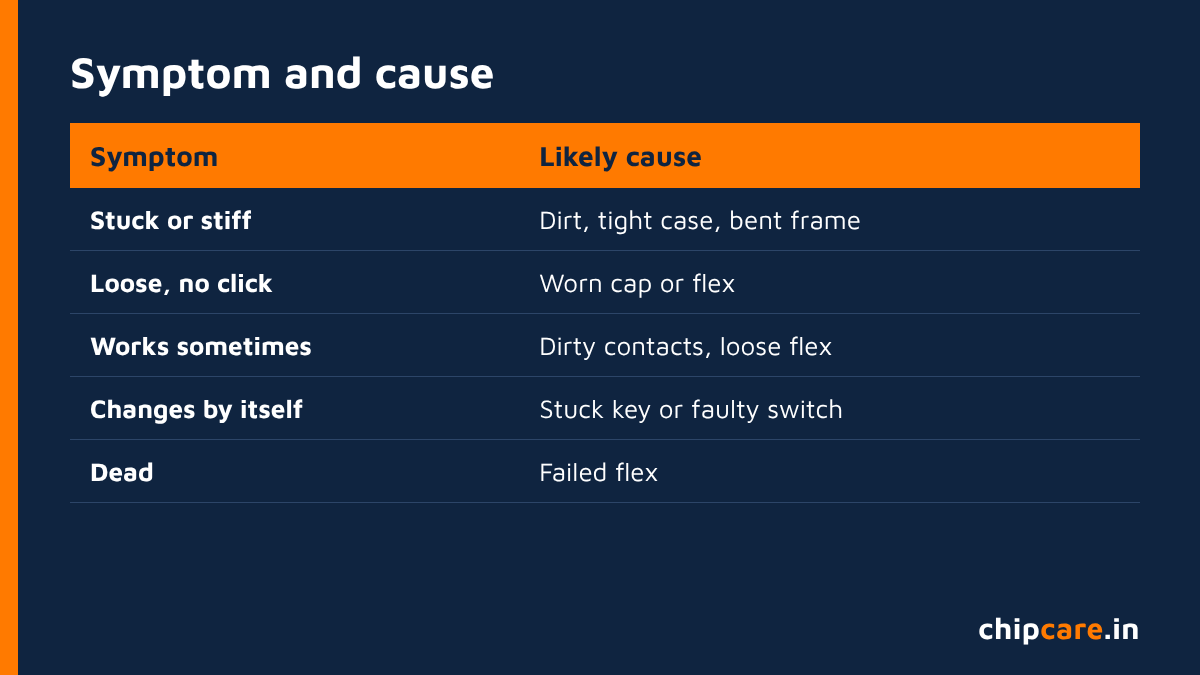
What the symptom means
| Symptom | Likely cause | What to do |
|---|---|---|
| Button feels stuck or hard to press | Dirt, a tight case or a bent frame | Remove the case; clean around the button |
| Button is loose and does not click | Worn or missing button cap, or a displaced flex | Replace the cap or the flex |
| Button works only sometimes | Dirty or worn contacts; loose connector | Clean; reseat or replace the flex |
| Volume changes by itself | Stuck button or a faulty switch | Check for stuck keys; replace the flex |
| Nothing happens on press | Software issue or a failed flex | Restart; test in safe mode; replace the flex |
| Button stuck after water exposure | Corrosion or swelling | Let it dry; see water damage steps |
A tight case is one of the most common reasons a volume button feels stuck. Take it off before you worry about the phone.
Step-by-step checks
- Remove the case.
A case that is too tight can press the buttons permanently, or block them from moving properly. - Look at the button.
Check for a gap between the button and the frame, dirt in the gap or a visible bend in the frame. - Clean around the button.
Use a soft brush or a toothpick, without pressing hard, to lift dirt. A tiny amount of isopropyl alcohol on a cotton bud can clean the edges. Do not flood it. - Test the buttons.
Many phones have a built-in hardware test, or you can use a button-test app. Check that each key is detected. - Restart and update.
A software issue can make a button seem dead. - Try safe mode.
If the button works in safe mode, an app is interfering, for example a screen recorder or a button-remapping app. - Use the on-screen volume.
You can change volume from the settings or the on-screen slider while you wait for a repair.
If the phone is bent, do not try to bend it back. A twisted frame can crack the screen and damage the board. Ask a technician to look at it.
Water, grime and swelling
Buttons that got wet can corrode or stick. If your phone was exposed to water, turn it off, dry it in open air and read what to do after water damage. A swollen battery can also press against the frame and make buttons stiff or push them out of line. If the back panel is lifting or the case no longer fits, treat it as a safety issue and read swollen battery dangers.
Repair options
If cleaning and a restart do not help, the usual repair is to replace the volume button flex cable, and sometimes the button caps. On many phones, the volume flex shares a cable with the power button or the board, so the repair involves opening the phone and disconnecting the battery. For iPhones, see our iPhone volume button parts. For most Android phones, the part is listed under the model's spare parts, and you can browse mobile phone spare parts for related items.
- Cap or button replacement. The easiest fix when the key is loose or missing.
- Flex cable replacement. For dead or intermittent buttons.
- Frame or housing repair. If the frame is bent or the button seat is damaged.
- Board repair. Rare, but possible when the switch is soldered to the board.
If you plan to open the phone yourself, follow our screen replacement guide for the safe opening process, keep ESD-safe habits and use the right tools.
After the repair
- Test both volume keys and the power button for a firm click.
- Check that volume changes in calls, media and ringer modes.
- Check that the buttons do not rattle or stick when you hold the phone.
- Fit a case that does not press on the buttons.
- If you use a protective case, check that it has the right button cut-outs or covers.
Preventing button problems
Choose a case that fits properly and leaves the buttons free. Keep the phone out of dusty and wet places, wipe it now and then and avoid sitting on it. For anyone who uses the buttons heavily, such as for gaming or photography, consider using on-screen controls or a trigger-style accessory to share the load. If a button feels loose, replace it early. A loose button can let dust in and damage the switch behind it.
Find mobile phone spare parts
Browse parts by phone model and category, with clear grades and warranty.
Why buttons fail more on some phones
Metal and glass phones give the buttons very little room, and the frame around them is thin. If the phone is dropped on its side, the frame can bend slightly and press on the key from behind, which makes it stiff or stuck even though nothing looks wrong. Phones used in a tight holster or a rugged case can have the same problem. If a button became hard to press right after a fall, tell the technician, because a frame adjustment may be needed alongside any part replacement.
Frequently asked questions
Why is my phone volume button stuck?
Common causes are dirt around the button, a case that is too tight or a bent frame. Remove the case and clean around the button gently.
Can I fix a volume button without opening the phone?
Sometimes, by removing the case, cleaning around the button and restarting. If the button is dead or loose, you will need to open the phone and replace the flex or the cap.
Why does my volume change by itself?
A stuck or faulty volume key can press itself. Check for a tight case or debris, and if it continues, replace the flex cable.
Is a software update able to fix a dead volume button?
Only if the cause is software. If the button is physically faulty, an update will not fix it.
Will a case damage my volume buttons?
A case that fits badly or presses on the keys can make them feel stuck or wear them faster. Choose a case with the right cut-outs.
How much does a volume button repair cost?
The parts are inexpensive. Labour depends on how hard the phone is to open and whether the volume flex is separate or shared with other parts.


