


The phone switches on, shows the brand logo and then either stays there forever or restarts and shows the logo again. This is a boot loop, or a stuck-on-logo fault, and it is one of the scarier things a phone can do. The phone is not dead. It starts, but it cannot finish loading the system. The cause may be a failed update, corrupted system files, a full or failing storage chip, a bad battery that cannot supply enough power to boot or a damaged board. This guide explains what each pattern means, the safe steps to try before you reset, how to protect your data and when to hand the phone to a technician.
What is happening during boot
When you press the power button, the phone loads a small program from its storage that starts the system. It then loads the main system, starts services and shows the home screen. A fault at any step can stop it. If the logo appears and then repeats, the phone is usually crashing during the system load. If the logo stays and nothing changes, the system may be stuck waiting for storage or power. A phone with a weak battery may power up and then switch off as soon as the load rises, which looks like a boot loop. A phone with a damaged storage chip may hang at the logo as it tries to read a bad area. See phone not turning on: causes and fixes for the cases where nothing appears at all.
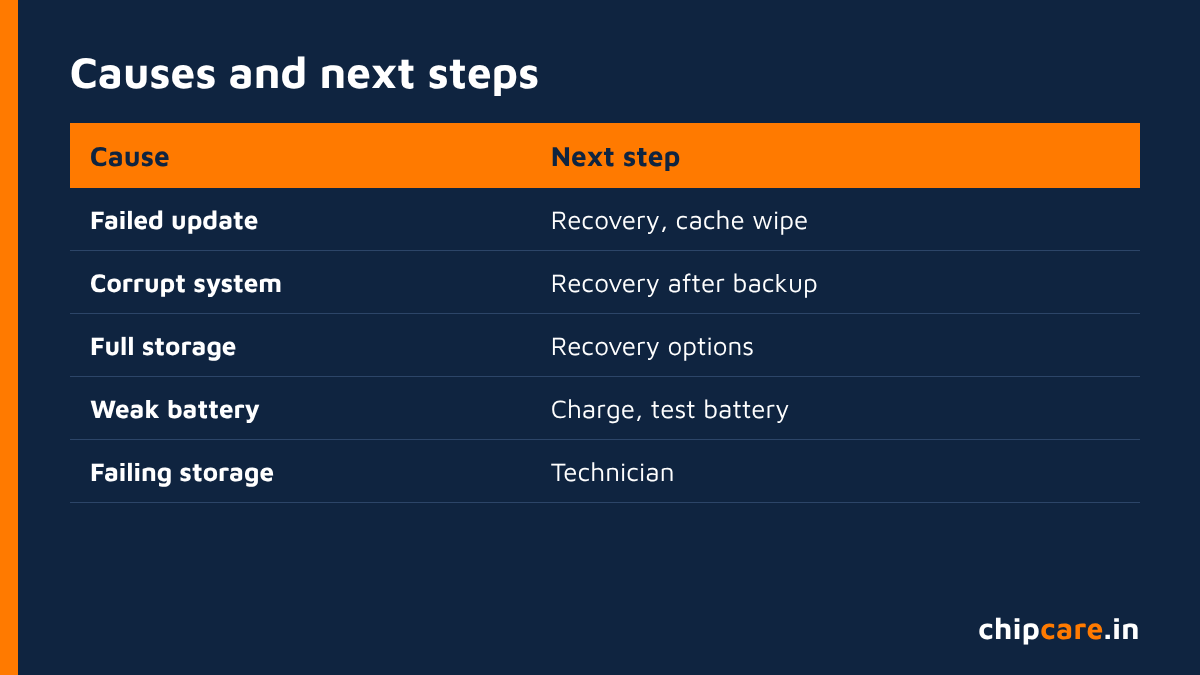
Causes and next steps
| Cause | Clue | Next step |
|---|---|---|
| Failed or interrupted update | Started after an update | Recovery mode, cache wipe, reinstall |
| Corrupt system files | Started after an app or tweak | Recovery mode, factory reset after backup |
| Full storage | Phone was nearly full before | Recovery options, then free space |
| Weak or dead battery | Starts only on a charger | Charge fully, test another battery |
| Failing storage chip | Hangs even after a reset | Technician diagnosis |
| Water or drop damage | Event before the fault | Technician inspection |
| Bad system modification | Phone was modified | Reflash official software |
Before you reset a phone that will not boot, ask what you will lose. A reset erases the data you came to save.
Step by step: safe things to try
- Charge the phone fully.
Use a good charger for at least 30 minutes. A low battery can cause the loop. - Force restart.
Hold the power button, or the model's key combination, for about 10 to 15 seconds. - Remove the SIM and memory card.
A faulty card can stall the boot on some phones. - Disconnect accessories and cables.
Boot with nothing attached. - Try safe mode if it reaches the home screen.
Remove recent apps. - Enter recovery mode and wipe the cache.
This clears temporary system data and does not erase your files on most phones. - Consider a factory reset only if the data is backed up or already lost.
See how to back up a phone before repair. - Reflash official software.
A technician can do this with the maker's tools if recovery does not work.
How to protect your data
If the phone cannot start, you have limited ways to save data. If you have a recent cloud backup, you are in a good position and the reset is low risk. If not, a technician may be able to boot the phone into a mode that lets data be copied, or to repair the fault without erasing it. Do not attempt random fixes that write to the storage. If the phone is encrypted, as most are, data is hard to recover once it is erased, so the order of steps matters. Say clearly at the shop that the data matters most. See what a phone repair warranty covers for what to ask.
Do not keep trying to reboot a hot or swollen phone. A failing battery can be dangerous. See the swollen battery guide.
When a battery is the real cause
A worn battery can drop below the voltage the phone needs during boot, because starting the system is a power-hungry moment. The phone may reach the logo on the charger and fail without it. This is common on older phones and after a deep discharge. A technician can check with a known good battery or a bench power supply. If the phone boots normally with a good battery, the repair is a simple battery replacement. See phone battery health check: when to replace and phone restarting randomly fix. You can browse mobile phone batteries by model.
When the board or storage is at fault
If a reset and a reflash do not help, the storage chip or the board may be damaged. A board repair needs micro-soldering skills and may not be worth it on a lower-value phone. For some phones, the repair is a replacement board. Ask the technician for a clear diagnosis and a quote before you agree. See phone motherboard repair vs replace guide and repair or replace the phone: a decision guide.
Prevent a repeat
Keep a regular backup. Keep storage free. Install updates when the battery is above half and the phone is on a charger. Avoid unofficial system changes, which are a common cause of boot problems. Do not interrupt an update by switching the phone off. If the phone is old and slow, a new battery and a clean reset can give it extra life.
Common mistakes
- Resetting before checking for a backup.
- Interrupting an update.
- Leaving the phone on a charger with a swollen battery.
- Flashing software from an unknown source.
- Assuming the board is dead without testing the battery.
For repair shops
Test with a known good battery and a bench supply before you quote a board repair. Record the model, software version and what the customer says about data. Explain clearly that a reset erases the phone, and get approval first. See how to test phone parts before installing. For background, see the Wikipedia page on booting.
If the phone is encrypted
Most modern phones encrypt their storage by default, which keeps your data safe if the phone is lost. The same protection means that after some repairs or resets, the data cannot be read without your lock screen details. Remember your passcode and the account details linked to the phone before any service, since the phone may ask for them at the first start. Check that you can sign in to your main account on another device.
Frequently asked questions
What is a boot loop?
The phone restarts repeatedly before it reaches the home screen.
Will a cache wipe delete my files?
On most phones, no. It clears temporary system data only.
Can I save my data from a phone that will not boot?
Sometimes. A technician may copy it or repair the fault without erasing it.
Can a battery cause a boot loop?
Yes. A weak battery can fail during the power-hungry boot step.
Should I factory reset it?
Only after you have a backup or accept the loss of the data.
Is a stuck logo always serious?
Not always. Many are fixed with a charge, a cache wipe or a reflash.


