


The flashlight is one of those features you only miss when you urgently need it: a power cut, a dark staircase, a repair job under a desk. When the torch icon does nothing, turns on for a second and dies, or refuses to work only while the camera is open, it is natural to suspect the LED itself. Sometimes that is right, but more often the cause is software, a low battery rule, a camera conflict or heat protection. This guide separates the harmless causes from the real hardware faults and shows what a repair involves when the LED or its flex really has failed.
How the flashlight works
The flashlight and the camera flash are normally the same LED, placed next to the rear camera. The phone's software switches it on at a lower power for torch mode and at a short burst for photos. That is why a torch fault often shows up in the camera as well. If the LED lights in the camera app but not from the quick settings tile, the LED is fine and the problem is in settings or software. If it never lights anywhere, the LED, its cable or the driver on the board is suspect. Understanding this saves you from replacing parts that are working perfectly well.
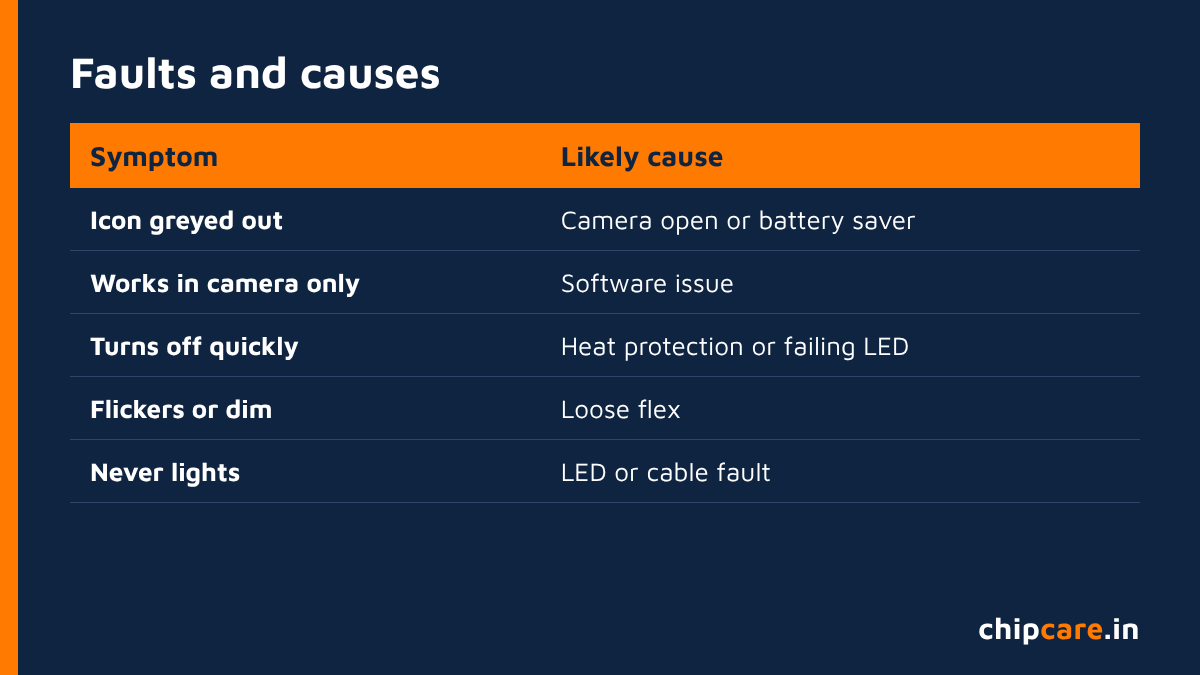
Symptoms and likely causes
| Symptom | Likely cause | First check |
|---|---|---|
| Torch icon greyed out or refuses | Camera app open, battery saver or low battery | Close the camera, charge, turn off saver |
| Works in camera, not from tile | Software or settings issue | Restart and update |
| Turns off after a few seconds | Heat protection or a failing LED | Let the phone cool and retest |
| Flickers or is dim | Loose flex or a dying LED | Technician check |
| Never lights anywhere | LED, cable or board fault | Technician check |
| Stopped after a repair or fall | Disconnected or damaged flex | Reseat the cable |
When the torch refuses to start on a hot or nearly empty phone, that is often the phone protecting itself, not a broken part.
Step by step: fixes to try
- Close the camera and other apps.
The camera and the torch cannot always use the LED at once. Close both and try again. - Check the battery level and saver mode.
Many phones disable the torch below a low battery level or in strict power saving. - Let the phone cool.
If the phone is hot, rest it somewhere cool and try again after a few minutes. - Restart and update.
A restart clears stuck states, and an update may fix a known torch bug. - Test in safe mode.
If it works there, a third-party app or a torch widget is interfering. Remove recent installs. - Remove the case.
Some cases block the light, and some press on the area around the flash. - Back up and reset if needed.
As a last software step, reset the phone after a backup. See how to back up a phone before repair.
When the hardware has failed
If the LED never lights after the software steps, a technician will open the phone and check the flash. On many models the LED sits on a small flex or on the camera module's board, and a fall can loosen the connector. Water damage can corrode it as well, so check the phone against the water damage guide if the phone has been wet. A technician can reseat the cable, test the LED with a meter and replace the part if it is dead. On some phones, the LED is part of the rear camera assembly, so a repair may mean replacing the camera module. You can see mobile phone back cameras by model, and read camera replacement cost to understand what drives the price.
Do not look into the LED up close when testing. Phone flash LEDs are bright. Test them pointed at a wall, and keep them away from your own and other people's eyes.
Common mistakes
- Replacing the camera before closing apps and checking battery saver.
- Testing the torch on a hot phone and assuming the LED is dead.
- Using third-party torch apps that conflict with the system torch.
- Opening the phone without knowing where the flash cable connects.
- Forgetting to retest after a camera or screen repair.
Using the torch without harming the phone
The torch is a power-hungry feature and produces heat, especially on thin phones. Avoid leaving it on for long periods inside a case, and do not use it while the phone is charging in a warm place. If the phone gets noticeably warm, switch it off and let it rest. A phone that overheats often is worth checking against overheating causes and fixes, because the heat itself may be the underlying fault.
For repair shops, test the torch and the flash at the end of every camera, screen or back-glass job, together with the rear camera and the microphone. A torch that stops after a repair is a common return, and a thirty-second check at the counter prevents it. See how to test phone parts before installing. For background on the light source, see the Wikipedia page on the light-emitting diode.
Why the torch matters more than it seems
People use the flashlight far more than the camera flash. It lights a keyhole, a fuse box, a charger socket in a dark corner or the inside of a laptop during a repair. Because it is used in short bursts, a fault is easy to miss until the moment of need, and by then the phone may have been dropped, repaired or updated several times, which makes it hard to say when it stopped. A simple habit helps: test the torch once a month, and always after any repair, software update or fall. If you find it dead, you can note the date and the last event, which makes the diagnosis much faster for a technician.
Also check the quick settings tile itself. On some phones the tile can be removed or replaced by a third-party shortcut, and a stale shortcut can look like a dead torch. Add the system tile again from the quick settings editor, and test with the lock screen shortcut, if your phone has one. If one route works, the LED is healthy and only the shortcut is broken. This takes under a minute, and it rules out a good many unnecessary repair visits.
Lastly, remember that very cold weather reduces battery output, and phones sometimes switch the torch off to protect the battery in the cold, just as they do in the heat. Warm the phone gently in a pocket, and the torch usually returns.
Frequently asked questions
Why is my phone flashlight not working?
Common causes are the camera being open, battery saver, a hot phone, a software glitch or a failed LED or cable.
Why does the torch turn off by itself?
Heat protection or low battery rules are common causes. A failing LED can also cut out.
Does the flashlight use the camera flash?
Yes, on most phones they are the same LED, so a torch fault can affect photos too.
Can I replace just the flash LED?
Sometimes. On many phones the LED is part of the camera module or its flex, so the repair may be bigger.
Will a reset fix it?
It can fix a software cause but not a hardware fault. Back up first.
Is the torch safe for the eyes?
Avoid shining it at faces up close. Treat it like any bright light.


