


A phone call where the other person says they can hear themselves, or where your voice cuts in and out, is more than irritating. It can make a call useless. Echo and breaking voice can come from the phone's microphone and speaker, from the network, from the other person's device, from a Bluetooth headset or from software noise cancellation going wrong. This guide helps you find the source: whether it is your phone, the other end or the line between, and what to do about each case. Along the way, it shows the hardware faults that cause these symptoms and the quick tests that reveal them.
Whose phone is it?
Echo is usually caused by the other person's device, not yours. When your voice comes out of their speaker and into their microphone, you hear it back. That happens with speakerphone, cheap headsets and some laptops. If several people tell you that they hear echo, the cause is likely yours; if only one does, it is probably theirs. Breaking voice, on the other hand, is usually a network problem. The best test is to call a second person and, if possible, use another network. If the fault follows your phone everywhere, look at the phone; if it disappears, the problem was the line or the other end.
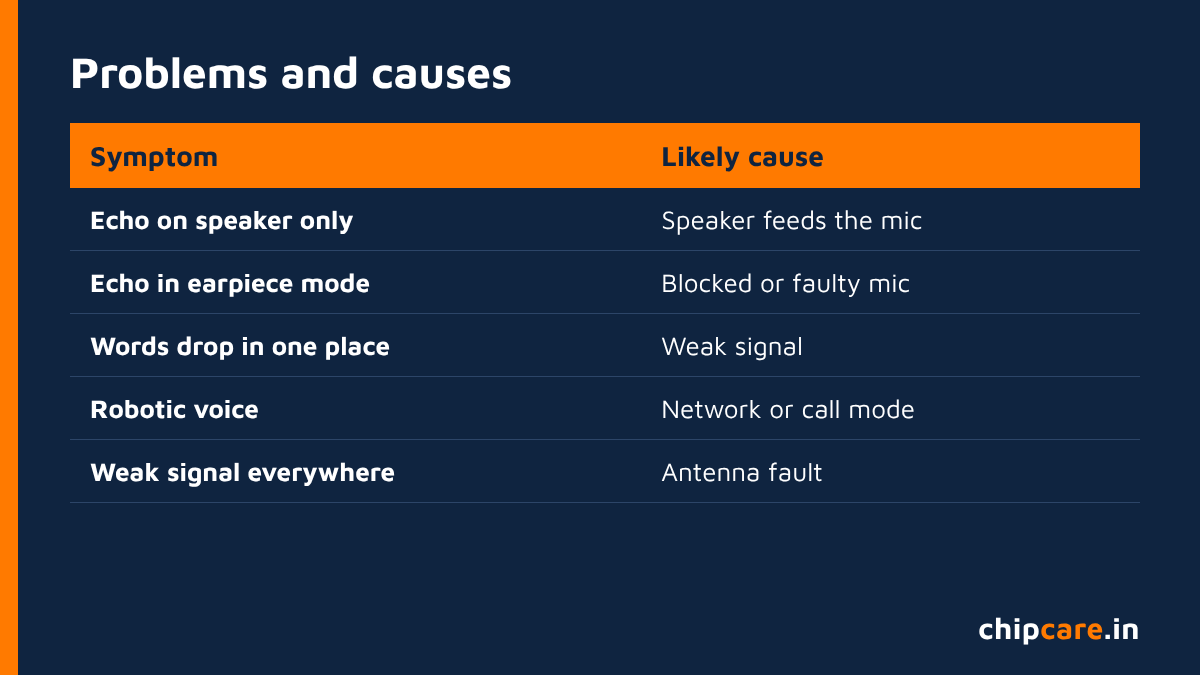
Symptoms and likely causes
| Symptom | Likely cause | First check |
|---|---|---|
| Caller hears their own voice | Their speakerphone or headset | Ask them to use the earpiece |
| Voice cuts in and out | Weak signal or congestion | Move, try Wi-Fi calling |
| Robotic voice | Poor network or software processing | Test on another network |
| Muffled voice | Blocked microphone or case | Clean the mic hole, remove case |
| They cannot hear you at all | Mic fault or permissions | Test with a voice recorder |
| Started after a drop or repair | Microphone or antenna fault | Technician check |
Record yourself with a voice recorder app. If the recording is clear, the microphone is healthy and the problem is in the call path.
Step by step: fixes to try
- Test with another person and another network.
Find out whether the fault follows the phone. - Test the microphone.
Record a voice note and play it back. See phone microphone not working fix. - Clean the microphone and speaker openings.
Use a soft brush or wooden toothpick. See how to clean a phone speaker grille safely. - Remove the case and any protector over the openings.
A badly cut case can block the microphone. - Disconnect Bluetooth.
The call may be routing to a headset you forgot about. - Try Wi-Fi calling.
If your phone and operator support it, it can improve quality at home. - Restart and update.
Install system and operator updates.
When the hardware is at fault
If the recording is poor, the microphone, its port or its cable may be at fault. On many phones the microphone is on the charging-port board, so a loose or damaged board can cause muffled or one-way audio. If your voice breaks only on mobile networks and the phone struggles for signal elsewhere, the antenna may be the issue. See phone network signal drops, phone earpiece not working fix and phone speaker low sound or crackling fix. A technician can test each part and replace the faulty one. If water was involved, see what to do after water damage. You can browse mobile phone ear speakers and charging ports by model.
If you hear loud crackle or distortion on every call, stop using speakerphone at high volume. Damaged speakers can worsen with use, and a quick check can save a more costly repair.
Noise cancellation and call apps
Modern phones use software to cancel background noise and reduce echo. Usually it helps, but sometimes it makes your voice sound strange, particularly in a noisy place or when the phone's microphone is partly blocked. Some phones have a setting to turn noise suppression on or off, and some call apps offer their own. If the problem appears in one app only, check that app's audio settings. If it appears everywhere, try a different dialer or turn off the noise setting to see whether it changes. Remember that wind, traffic and music in the background can overwhelm any software. For important calls, move somewhere quieter.
Common mistakes
- Blaming the phone for echo that comes from the other end.
- Pushing pins into the microphone hole.
- Forgetting that a headset may be connected.
- Replacing the earpiece when the network was weak.
- Not testing the microphone with a recorder first.
For repair shops
For call quality complaints, test microphone, earpiece, speaker and signal separately, and call a known-good phone while recording the call. Check the charging-port board if the microphone fails. After any repair, make a test call and a recording. See how to test phone parts before installing. For background, see the Wikipedia page on echo cancellation.
Why echo and breaking voice are different faults
People often describe both problems as a bad call, but the causes are different and so is the repair. Echo is heard by the person at the other end, who hears their own voice come back a moment later. It happens when the microphone on your phone picks up the sound from your loudspeaker or earpiece and sends it back. Breaking voice, where words drop out or sound robotic, is usually a network or processing problem, a poor signal or a microphone that is failing in bursts. Ask the other person what they hear, because you cannot judge your own microphone from your side of the call.
Echo is most common on speakerphone, where the loudspeaker is close to the microphone. If echo also happens in earpiece mode, check for a damaged or blocked microphone, a cover that presses on the mic hole or a screen protector that covers the earpiece. A case with a badly aligned cut-out can also bounce sound back into the bottom microphone. Try the call with the case off, then in a quiet room, then with wired earphones. Each test removes one possible cause.
When the signal is to blame
Broken voice that happens in one room or one area and not elsewhere is almost always signal. Phones switch between networks and calling modes, and a weak signal can push the call through a poor path. Try calling over Wi-Fi if your phone and network support it, or move near a window. A damaged antenna connection after a drop or a repair can also lower signal everywhere. If the phone shows weak signal compared with another phone on the same network in the same place, the fault is in the phone and not the network. See phone network signal problem fix for the matching checks, and phone microphone not working fix if the other person cannot hear you at all.
Frequently asked questions
Why do I hear an echo on calls?
Usually the other person's speakerphone or headset. If many people hear it, check your phone.
Why does my voice break up on calls?
Weak signal or network congestion are common causes. Try Wi-Fi calling or move.
How do I test my microphone?
Record a voice note and play it back. A clear recording means the microphone works.
Can a case cause muffled calls?
Yes, if it blocks the microphone. Test without it.
Can the microphone be repaired?
Often yes, by replacing the part or the board it sits on.
Does Wi-Fi calling help?
It can, where the phone and operator support it and the Wi-Fi is strong.


