Ordering the wrong phone battery is one of the most common and most avoidable mistakes in mobile repair. Two phones from the same brand can look identical and still use batteries that differ in connector, size and capacity code. A battery that does not fit wastes a day, and a battery that almost fits can be unsafe. The good news is that every battery carries clues that identify it. This guide shows where to look, how to read the codes and how to confirm the match before you buy.
Why model names are not enough
Phone makers sell many versions under one marketing name. A model may have different variants for different regions, with slightly different internals, and a battery that suits one may not suit another. Names such as "Note", "Pro" or "Lite" are used for several generations. That is why a battery search by name alone is risky. The reliable route is to use the exact model number and the battery code together.
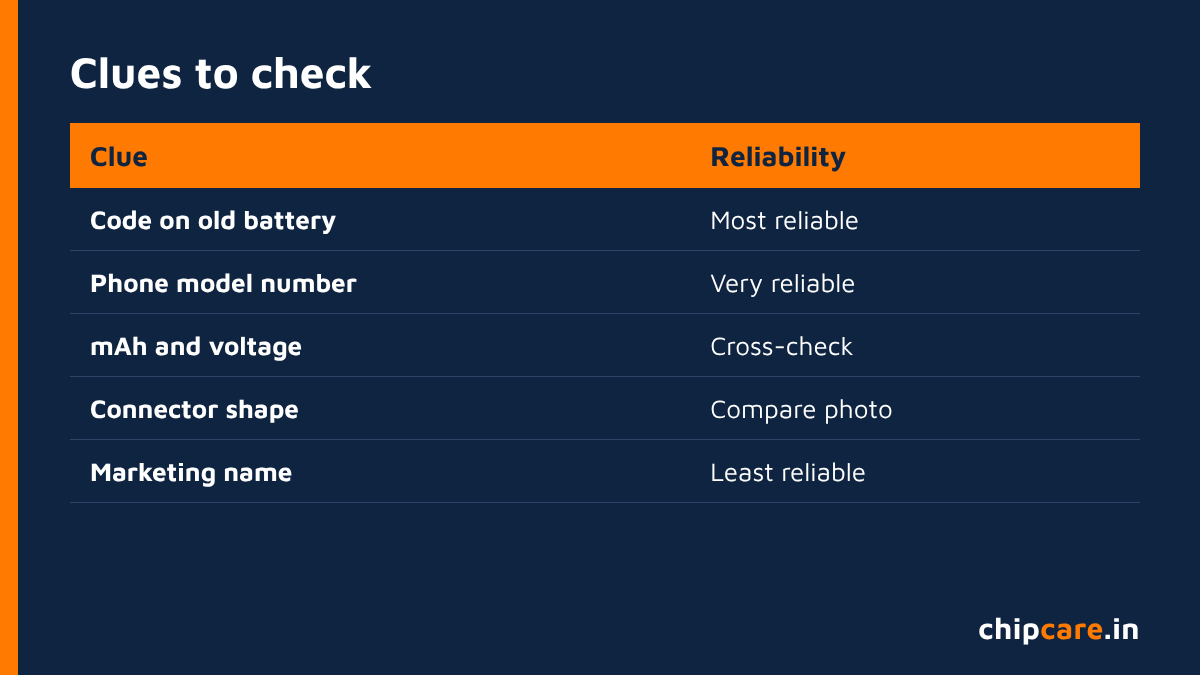
Where to find the clues
| Clue | Where to find it | How reliable |
|---|---|---|
| Battery code on the old battery | Printed on the label of the battery itself | Most reliable |
| Phone model number | Settings, About phone, or the box and back label | Very reliable |
| Capacity in mAh and voltage | On the battery label | Useful for cross-checking |
| Connector shape | Visible on the old battery | Check against the photo of the new one |
| Marketing name | On the box | Least reliable alone |
The code printed on the old battery is the single best clue. Everything else is for confirming it.
Step by step: identify the battery
- Find the phone's model number.
Open Settings, then About phone, and note the model number. Read it carefully, because a single letter can mark a different variant. - Look at the old battery label.
If you can open the phone, read the code on the battery. It is usually a combination of letters and numbers. Note the capacity and the voltage as well. - Compare with the listing.
The listing should name the model and ideally the battery code. If it names only a series, ask the seller to confirm. - Check the photo.
Compare the shape, the connector position and the cable length. Check that the connector sits at the same end and in the same orientation. - Check the capacity.
Capacity should be close to the original rating. For why that matters, see what mAh means. - Confirm the grade.
Ask whether the battery is original, OEM or compatible. See original vs OEM vs compatible spare parts.
When the battery cannot be seen
Many modern phones have batteries that are sealed behind the back glass or the screen, and you cannot read the code without opening the phone. In that case, rely on the model number and a trusted seller's compatibility list. If you are repairing a customer's phone, note the model number and the region before you order, and read the code once the phone is open, before you fit the new battery. Our guide on non-removable batteries explains why sealed designs are common and how replacement works.
Brands also organise batteries by series. You can browse our Redmi, Realme, Vivo, Oppo and OnePlus battery categories by model.
Warning signs of a wrong or poor battery
- The connector does not line up, or needs force to seat.
- The battery is thicker or longer than the old one and bulges the back cover.
- The label has no code, no capacity or inconsistent print.
- The capacity is far higher than the original rating. See why very high mAh claims are suspicious.
- The battery gets warm during a first charge, or the phone shuts down early.
Never force a battery into the phone, and never use a battery that looks swollen. See swollen battery dangers for how to handle one safely. Our guide to testing phone parts before installing shows how to check a battery before it goes in.
Keep the old battery until the new one works. If a battery turns out to be wrong, the old one lets you compare codes, and it avoids a second trip to the shop. Store a swollen battery safely and dispose of it responsibly.
Safe handling when you change it
- Switch off the phone.
Let the battery run low if it is safe to do so, because a low battery is safer to handle. - Disconnect the battery first.
Always unplug the battery connector before touching other parts. - Do not puncture or bend the battery.
Use plastic tools to lift it away from adhesive, and apply heat gently to soften the glue. - Connect the new battery and test.
Before closing the phone, check that it switches on and charges. - Seal and run a charge cycle.
Refit the cover, then charge fully and watch the first discharge for odd behaviour.
Our how to replace a phone battery safely guide gives the whole process. For tools, see mobile repairing tools.
For repair shops: build a simple record
If you replace batteries often, keep a record of the phone model, the battery code that worked, the supplier and the date. A simple sheet with these columns saves a lot of time, because the next customer with the same phone gets the right battery on the first try. Note any phones that have variants and the clue that told them apart. Over a few months, this becomes a reliable reference for your own shop. For the business side of repairs, see how to price phone repairs.
For background on the cell chemistry, see the page on the lithium-ion battery.
Understanding the numbers on the label
A battery label usually carries three kinds of information. The capacity, in mAh, shows how much charge the cell holds. The voltage, often around 3.8 V or 3.85 V for modern phones, and a higher figure for the full-charge limit, tell you the cell type. The code is the identifier that the maker or supplier uses. If two batteries have the same code but a different capacity, treat the lower-priced one with suspicion. If the voltage on the label differs from the original, the battery is not designed for your phone, whatever the listing says. Take a clear photo of the label before you remove the battery, because the print can fade or tear off.
Frequently asked questions
How do I find the right battery for my phone?
Use the exact model number from Settings and the code printed on the old battery. Compare the connector and size with the listing photo.
Is the phone name enough to choose a battery?
No. Phones sold under the same name can have different variants and different batteries. Always use the model number.
What if I cannot see the battery code?
Rely on the model number and a trusted seller's compatibility list, and read the code when you open the phone, before fitting the new battery.
Can a battery with a higher mAh be used?
Do not buy on mAh alone. A very high rating on a battery of the same size is a warning sign. Match the original rating.
What happens if I fit the wrong battery?
It may not fit, may not charge properly or may be unsafe. Never force a battery into a phone.
Should I keep the old battery?
Yes, until the new one works, because it lets you compare codes. Store a swollen battery safely and dispose of it responsibly.